
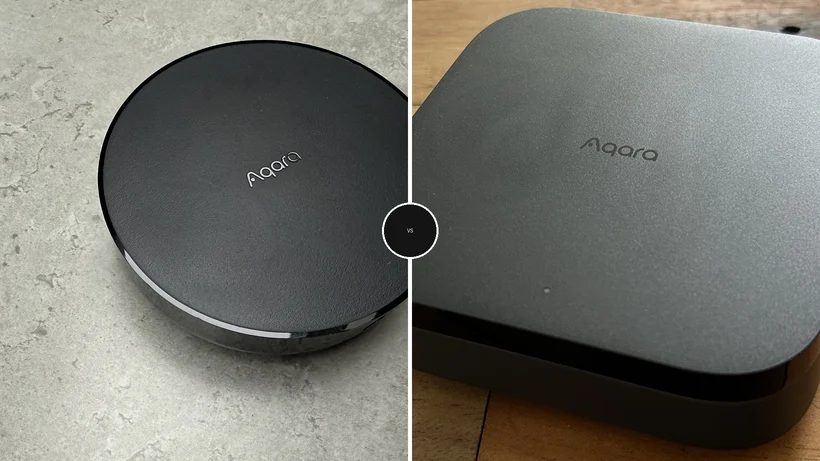
The smart home landscape is constantly evolving, with new devices and protocols emerging to enhance convenience and automation. At the heart of many smart home ecosystems are hubs, the central control points that orchestrate communication between various devices. Aqara, a prominent player in this market, offers two compelling hub options: the Aqara M200 and the Aqara Hub M3. While both promise robust connectivity and integration, they cater to distinct user needs and budget considerations. This detailed analysis aims to provide a comprehensive comparison, dissecting their design, setup processes, performance capabilities, Matter support, and overall value proposition to help consumers make an informed decision.
Understanding the Smart Home Hub Landscape: A Brief Overview
Smart home hubs act as the brain of an automated home, translating commands and data between devices that may use different wireless protocols like Zigbee, Z-Wave, Wi-Fi, or Bluetooth. The advent of Matter, a new industry-standard connectivity protocol, aims to simplify interoperability between smart home devices from different manufacturers. Thread, a low-power, IP-based wireless networking protocol, is also gaining prominence, particularly for its role in enabling Matter. For consumers, choosing the right hub often boils down to the size and complexity of their existing or planned smart home setup, their technical comfort level, and their investment in specific ecosystems.
Design and Physical Integration
The Aqara Hub M3 distinguishes itself with a more refined and practical design, clearly aimed at seamless integration into a modern living space. Its compact, square chassis in a matte black finish lends it an aesthetic appeal that complements contemporary decor. Beyond its visual appeal, the M3 incorporates several functional enhancements. Power over Ethernet (PoE) support is a significant advantage, allowing for a single Ethernet cable to provide both network connectivity and power. This simplifies installation, reduces cable clutter, and offers greater placement flexibility, especially in rooms where power outlets are scarce or aesthetically unpleasing. Furthermore, the M3 boasts an integrated 95dB speaker, a feature that significantly enhances its utility for security alerts, notifications, and even as a basic alarm system. The inclusion of a wall mount kit further adds to its versatility, enabling users to position it discreetly or prominently as needed.

In contrast, the Aqara M200 adopts a more minimalist and utilitarian design. Its compact, circular form factor is unobtrusive and designed to blend into the background rather than make a design statement. While it is not visually unappealing, its design prioritizes discretion. The M200 offers a 1/4-inch thread for mounting, providing a basic option for installation, though it lacks the integrated convenience of the M3’s dedicated bracket. Power is supplied via USB-C, a common and accessible standard, with PoE available as an optional upgrade, suggesting a tiered approach to its feature set. The M200’s design philosophy appears to be centered on delivering core functionality without unnecessary embellishments, making it a more budget-conscious choice.
Winner: Aqara Hub M3
The M3’s superior design, coupled with practical features like PoE and an integrated speaker, positions it as the more premium and user-friendly option for physical integration.
Streamlined Setup and Connectivity Options
Both the Aqara M200 and M3 offer flexible connectivity, supporting both Ethernet and Wi-Fi, ensuring users can choose the most stable and convenient network option. The initial setup process, facilitated by the intuitive Aqara app, is straightforward for both devices. However, the Aqara Hub M3 elevates the setup experience with several advanced features. Its support for 5GHz Wi-Fi offers a distinct advantage in environments with a high density of 2.4GHz devices, potentially leading to a more robust and less congested wireless connection. A particularly valuable addition is the Bluetooth fallback mechanism, which proves invaluable when the app struggles to automatically detect the hub during the initial pairing process.
Perhaps the most significant differentiator in setup is the M3’s sophisticated migration tool. This feature is a game-changer for existing Aqara users looking to upgrade from older hubs like the M1S or M2. The migration tool seamlessly transfers child devices, their configurations, custom names, and established automations and rules in a matter of seconds, minimizing downtime and the effort required to reconfigure a smart home system. This attention to user experience for existing customers is a testament to Aqara’s commitment to its product ecosystem.

The M200, while still offering a user-friendly setup, keeps things simpler. It also includes PoE support, which, as mentioned, is a practical benefit for installation. However, it lacks the advanced features of the M3, such as the dedicated migration tool and the Bluetooth fallback, meaning users upgrading from older systems will need to re-establish connections manually. The M200’s Wi-Fi capabilities are limited to the 2.4GHz band.
Winner: Aqara Hub M3
The M3’s advanced connectivity options, including 5GHz Wi-Fi and the invaluable migration tool, provide a more sophisticated and user-friendly setup experience, particularly for existing Aqara users.
Performance and Local Processing Capabilities
A critical aspect of smart home hub performance is its ability to process automations and device commands locally, reducing reliance on cloud services and ensuring continued operation even during internet outages. Both the Aqara M200 and M3 are equipped with Zigbee and Thread radios, providing broad compatibility with a vast array of smart home devices. The performance divergence becomes apparent when examining their onboard processing and storage capabilities.
The Aqara Hub M3 is engineered as a powerful edge computing device. It boasts 128GB of onboard storage, allowing it to run virtually all automations and device settings locally. This means that even if your internet connection is disrupted, your smart home will continue to function seamlessly. This level of local processing is crucial for critical automations, such as security systems, climate control, and lighting schedules. Furthermore, the M3 introduces "ARK Mode 2," a feature that enables automatic failover when two M3 hubs are paired. This provides an additional layer of redundancy, ensuring uninterrupted operation even if one hub malfunctions. In a more extreme scenario, the M3’s "Device Binding" feature ensures that some connected devices can continue to operate independently even if the hub itself fails, a testament to its robust design.

The Aqara M200, while capable, operates with a more limited scope of local processing. It features 8GB of onboard storage, which is sufficient for managing basic local automations. These might include tasks like controlling underfloor heating or triggering a water valve shut-off in response to a leak sensor. In testing, the M200 has demonstrated reliability in executing these simpler routines. However, it cannot match the M3’s extensive local processing power and lacks the advanced backup and failover features. If the internet connection drops, the M200’s ability to execute complex automations is significantly constrained compared to the M3.
Winner: Aqara Hub M3
The M3’s advanced edge computing capabilities, substantial onboard storage, and robust failover mechanisms make it the clear winner for users prioritizing uninterrupted smart home operation and complex local automations.
Matter Support: A Tale of Two Approaches
The integration of Matter is a significant consideration for modern smart home setups, aiming to unify device control across different brands. The Aqara M200 adopts a sensible and practical approach to Matter integration, primarily functioning as a Matter bridge. This means it excels at exposing existing Aqara Zigbee devices to Matter-compatible platforms like Apple Home and Google Home. By keeping these devices on the Zigbee network through the hub, users can retain access to advanced features and functionalities that might otherwise be lost when devices are directly connected to a Matter controller. While initial testing indicated occasional challenges in adding new Matter devices directly to the M200, its core function as a bridge for existing Aqara devices is executed effectively and reliably.
The Aqara Hub M3’s Matter support, at its initial launch, presented some limitations. It was restricted to supporting only a select few brands, which was an unexpected constraint for a protocol designed for universal compatibility. While subsequent software updates have expanded its Matter device compatibility, Aqara itself has cautioned users about potential interoperability issues. Consequently, the M3, despite its advanced hardware, still lags behind dedicated multi-protocol hubs in its seamless integration with the broader Matter ecosystem. This suggests that while the M3 has the potential for robust Matter integration, it is still maturing in this area.

Winner: Tie
The M200 excels as a reliable Matter bridge for existing Aqara devices, while the M3, though more powerful, has had a more challenging and less complete Matter integration journey thus far.
Value Proposition: Balancing Features and Cost
When it comes to sheer value for money, the Aqara M200 emerges as the undisputed champion. It offers a substantial portion of the M3’s core functionality at a significantly lower price point. For users whose primary need is reliable Zigbee and Thread connectivity and Matter bridging without the need for extensive local processing, the M200 presents an exceptional bargain. The main sacrifice is the M3’s advanced edge processing, a feature that, given the current state of Matter integration on the M3, may not be fully utilized by many users at present.
The Aqara Hub M3 is positioned as the premium offering, retailing at $129.99 in the US and £129.99 in the UK. While it is undoubtedly the most capable Aqara hub available, its higher cost is largely attributable to its future-proofing capabilities and advanced local processing features, rather than immediate, universally accessible benefits. For individuals who anticipate a significant expansion of their smart home setup or require the utmost reliability for critical automations, the M3’s higher investment can be justified. However, for those with more modest smart home needs or who are simply looking to enhance their existing Aqara devices without overspending, the M200 represents a more prudent and cost-effective choice.
Winner: Aqara M200

The M200 provides superior value by delivering essential smart home hub features at a considerably lower cost, making it the more accessible option for a broader range of consumers.
Specifications Comparison
| Spec | Aqara M200 | Aqara Hub M3 |
|---|---|---|
| Price (UK) | Not stated | £129.99 |
| Price (US) | Not stated | $129.99 |
| Zigbee devices supported | 40 | 127 |
| Thread devices supported | 40 | 127 |
| Onboard storage | 8GB | 8GB (on-board); 128GB total |
| Ethernet (RJ45) | Yes | Yes |
| Wi-Fi | Yes (2.4GHz) | Yes (2.4GHz and 5GHz) |
| Power over Ethernet (PoE) | Yes | Yes |
| Zigbee support | Yes | Yes |
| Thread support | Yes | Yes |
| Matter support | Yes (primarily as a bridge) | Yes (evolving support) |
| Edge processing | No | Yes |
Final Verdict: Choosing the Right Hub for Your Needs
The decision between the Aqara M200 and the Aqara Hub M3 ultimately hinges on individual user requirements and budget constraints.
For those seeking a straightforward, cost-effective smart home hub, the Aqara M200 is the recommended choice. It capably handles Zigbee and Thread devices, reliably bridges existing Aqara gear to Matter platforms, and comes at a noticeably lower price point. It is an ideal solution for modest smart home setups or for individuals new to the Aqara ecosystem. Its robust performance for core functions and excellent value make it a compelling option for a wide audience.
Conversely, if you are looking for the most advanced and feature-rich hub Aqara currently offers, the M3 is the superior option. It demonstrated stronger performance in testing, boasts a more aesthetically pleasing design, and offers a more streamlined setup process, particularly for existing Aqara users. While it carries a higher price tag, this investment is justified for users with extensive smart home device collections or those who anticipate future growth and require the robust local processing and redundancy features that the M3 provides. The M3 represents the pinnacle of Aqara’s hub technology for those willing to invest in its advanced capabilities.

Frequently Asked Questions
-
Which hub should I buy if I want automations to keep running during an internet outage?
The Aqara Hub M3 is the right choice here. It runs every automation and device logic locally on the hub itself, so your routines keep working even if your internet connection goes down. The M200 does not offer this edge processing capability. -
Is the Aqara M200 good enough for connecting my Zigbee devices to Apple Home?
Yes, the M200 handles this job well. It acts as a Matter bridge, pushing your existing Aqara Zigbee devices out to platforms like Apple Home and Homey without any fuss. If that bridging function is your main goal, the M200 covers it at a lower price. -
Which hub offers better value for money?
The Aqara M200 wins on value. It delivers most of the same features as the M3 for significantly less money, and the main thing you give up is local edge processing, which many users will never notice on a reliable home internet connection. -
Which hub is a better fit for a dedicated smart home setup in a living room or media console?
The Aqara Hub M3 is the stronger pick for a visible, permanent installation. Its glossy matte black square body looks more at home in a modern living room, and practical additions like PoE support make it easier to place neatly without relying on a nearby power outlet. -
Does the Aqara Hub M3 support 5GHz Wi-Fi, and does it matter?
Yes, the Hub M3 supports 5GHz Wi-Fi, while the M200 does not. It also includes a Bluetooth fallback option during setup, which makes the initial connection process more reliable. For most users, this is a convenience rather than a necessity, but it gives the M3 more flexibility in homes with crowded 2.4GHz networks.

