
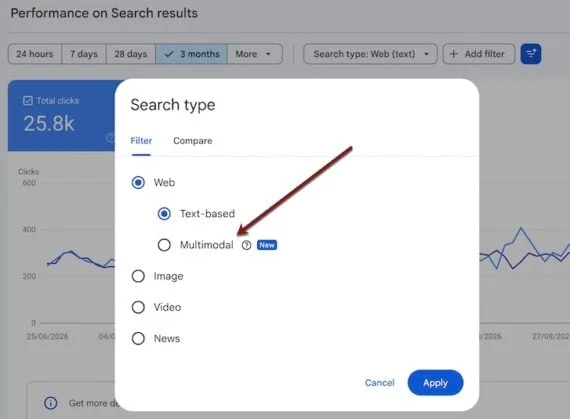
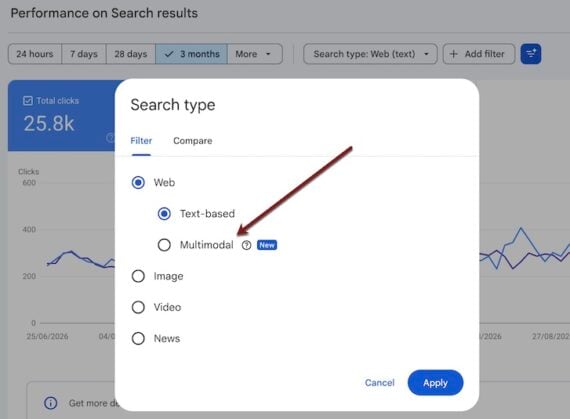
Google Search Console has introduced a significant update to its performance reporting tools, launching a new filter designed to provide webmasters and e-commerce merchants with unprecedented visibility into how their content performs within Google’s image search ecosystem. This new "Multimodal" filter, accessible within the Search Console’s Performance reports, allows users to see the specific URLs that users viewed and/or clicked after initiating a search using an image. This development marks a pivotal moment for understanding and optimizing for visual discovery, a rapidly growing avenue for product research and online shopping.
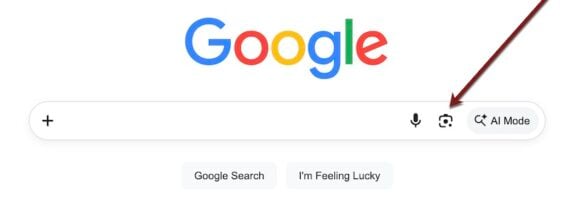
The introduction of this filter comes at a time when visual search capabilities are becoming increasingly sophisticated and integrated into everyday user behavior. Google offers image search through a variety of interfaces, including the primary Google Images search engine, Google Lens on mobile devices, and increasingly, through visual search prompts embedded within other Google products and services. Shoppers, in particular, have gravitated towards using visual cues to find products, making image search a critical, yet often opaque, discovery channel for e-commerce businesses. The new filter directly addresses this gap, offering actionable data that was previously unavailable.
Understanding the New Multimodal Filter
To access this new functionality, users navigate to Search Console, then select "Performance," followed by "Search results." Within the "Search type" dropdown menu, users will now find a "Web" option, and under that, the newly added "Multimodal" filter. It is crucial to note that this filter is specifically designed for image-based searches and does not provide traditional text-based queries. Consequently, there are no queries to list, nor does the filter directly display the exact image that a user searched with from a viewed page.
However, the filter does provide valuable insights, including:
- Pages Viewed: This metric indicates the URLs of the web pages that users landed on after performing an image search.
- Total Clicks: This shows the number of times users clicked through to a specific URL from an image search result.
- Total Impressions: This represents the number of times users saw a link to a specific URL in their image search results.
- Average Click-Through Rate (CTR): This metric calculates the percentage of impressions that resulted in a click, providing a measure of how compelling the search result is.
- Average Position: While not as granular as text search, this indicates the general ranking or visibility of a page within image search results.
The "Multimodal" designation reflects Google’s broader efforts to unify different types of search inputs and outputs, acknowledging that users often combine visual and textual elements in their search journeys.

The Evolving Landscape of Visual Search
Google’s capabilities in image search are not new; the company has been investing in this area for years. Features like Google Lens, which allows users to search using their camera or existing photos, have been available for some time. However, the ability to track performance specifically for these visual search queries within Search Console is a significant advancement. This shift reflects Google’s recognition of the growing importance of visual search as a primary discovery tool, particularly in the realm of e-commerce.
Data from various industry reports indicates a substantial increase in the adoption of visual search. For instance, studies by companies like Revuze and Similarweb have highlighted that a significant percentage of consumers, particularly younger demographics, are using visual search to find products. Some reports suggest that by 2025, visual search queries could account for a substantial portion of all searches, underscoring the strategic imperative for businesses to adapt. The introduction of the Multimodal filter is Google’s response to empower businesses with the data needed to capitalize on this trend.
Strategies for Image Search Optimization
With the new data now available, e-commerce merchants and SEO professionals can implement targeted strategies to improve their visibility and performance in image search results. The core principle remains the same: make your content easily discoverable and appealing to users.
Leveraging Image Sitemaps for Enhanced Indexation
Google’s ability to find and rank images relies heavily on its index. Submitting an image sitemap to Google Search Console is a crucial step. An image sitemap is an extension of a standard XML sitemap that provides Google with additional information about the images on your website, including their URLs, captions, and titles. By submitting an image sitemap via the "Indexing" > "Sitemaps" section in Search Console, you can explicitly point Google to your product photos and significantly improve their chances of being indexed and appearing in image search results.
Platforms like Shopify automatically include images in their sitemaps. However, for more granular control and better tracking of image indexation, merchants can consider using dedicated Shopify apps that generate image-only sitemaps. Similarly, platforms like WooCommerce offer plugins that can create specialized image sitemaps, helping to ensure that all relevant product imagery is discoverable by search engines.
The Enduring Power of Traditional SEO in Visual Search
While this is about image search, the foundational principles of traditional Search Engine Optimization (SEO) remain paramount. Images that rank well in standard text-based Google searches are highly likely to perform well in visual searches as well. This means that optimizing your images with:
- Descriptive, Keyword-Focused File Names: Instead of generic names like "IMG_1234.jpg," use names that clearly describe the product, e.g., "red-leather-crossbody-handbag.jpg."
- Alt Text (Alternative Text): This HTML attribute provides a textual description of an image for visually impaired users and for search engines. It’s a critical element for accessibility and SEO. Ensure your alt text is accurate, descriptive, and includes relevant keywords.
- Captions: While not as impactful as alt text for direct ranking, captions can provide context for users and search engines, further aiding in understanding the image’s content.
By applying these traditional SEO best practices, you create a strong foundation for your images to be understood by Google’s algorithms, making them more likely to be surfaced in both text and visual search results.
The Indispensable Role of Image Quality
The new filter’s data on clicks and impressions offers a direct insight into user engagement. When users view product images but do not click through, it often indicates issues with the image’s quality, resolution, size, or overall clarity. In the competitive landscape of e-commerce, a high-quality visual is often the deciding factor in whether a potential customer proceeds to the product page.
For instance, in testing, it has been observed that thumbnail images on collection pages, common in platforms like Shopify, can sometimes have lower click-through rates. This might be due to lower resolution or compression. To combat this, uploading high-resolution versions of your product images is recommended. A practical approach to test this is to download a thumbnail from a collection page, perform an image search for it on Google, and observe how it appears in the results. This can reveal if the image is pixelated or lacks detail, prompting an upgrade to a higher-quality version.
Strategic Experimentation with Product Imagery
Visual search engines are designed to identify objects within a photograph, regardless of the angle, color, or position of the object in the original image. However, the search results often prioritize images that closely match the searcher’s visual query in terms of positioning, angle, or dominant colors. This presents a significant opportunity for businesses to diversify their product imagery.
To capture a wider range of potential customers and improve ranking opportunities, consider providing a variety of product images. This includes:
- Multiple Angles: Showcasing products from different perspectives (front, back, side, top, bottom).
- Close-Up Details: Highlighting specific features, textures, or craftsmanship.
- Variations in Color and Style: If a product comes in multiple colors or configurations, ensure these are visually represented.
- Contextual Shots: Showing the product in use or within a lifestyle setting can help users visualize its application.
For example, if a user uploads a photo of the front of a plush toy, they are likely to see search results featuring similar toys from the front. By also providing images of the toy from the side or with its tags visible, you increase the chances of matching a wider array of user searches.
Harnessing the Power of AI for Visual Search Insights
The integration of Artificial Intelligence (AI), particularly Generative AI, is opening new frontiers for understanding and optimizing for visual search. AI tools can analyze vast datasets and identify patterns that might not be immediately apparent to human observers.
Marie Haynes, a prominent search optimizer, has suggested using AI platforms to generate insights for visual search optimization. For example, an AI tool could be prompted to identify common visual themes or specific product attributes that perform well in visual search. The example provided suggests prompting a genAI tool to identify "top-performing colors, textures, or styles of [product category] in visual search results."
The implication of such AI-driven insights is profound. If AI analysis reveals that pages featuring specific product colors or textures consistently perform better in visual search, businesses can proactively incorporate these elements into their product offerings and marketing materials. This could involve adding new color variations to existing products, highlighting specific textures in product descriptions and imagery, or even featuring complementary decor that incorporates these sought-after elements in lifestyle shots. The goal is to align your visual content with what users are actively seeking and what Google’s algorithms are prioritizing.
The Road Ahead: Data-Driven Optimization

The introduction of the Multimodal filter in Google Search Console is a significant step towards demystifying image search performance. It empowers e-commerce merchants with the data needed to understand how their products are being discovered visually and to optimize their strategies accordingly. By focusing on high-quality imagery, robust traditional SEO practices, strategic diversification of visual assets, and leveraging emerging AI tools, businesses can unlock the full potential of visual search as a powerful driver of traffic and sales.
As Google continues to refine its multimodal search capabilities, staying informed and adapting to these changes will be crucial for maintaining a competitive edge in the increasingly visual online marketplace. It is recommended that businesses regularly review their multimodal reports within Search Console, experiment with different optimization tactics, and track the results to continuously improve their performance in this vital area of search. The ability to connect the visual intent of a searcher with the right product image is becoming an increasingly critical component of a successful online retail strategy.

