
The global technology sector has entered a critical period of "conversational tunnel vision," a design phenomenon where the rapid proliferation of Large Language Models (LLMs) has led to the default adoption of chat-based interfaces for nearly every artificial intelligence capability. While the chat bubble has become the ubiquitous symbol of modern AI, industry analysts and user experience (UX) experts are increasingly warning that this reliance on dialogue-based interaction may be hindering productivity and compromising safety in specialized environments. As AI integrates deeper into professional workflows, the necessity of matching modality—the sensory method of interaction—to the user’s specific context, intent, and cognitive load has become a primary concern for product development teams.
The Rise and Limitations of the Conversational Paradigm
The shift toward conversational user interfaces (CUIs) was accelerated by the mainstream success of platforms like ChatGPT and Claude. Because these models are natively trained on dialogue data, product designers have largely treated the text box as the natural home for AI. However, this "one-size-fits-all" approach often ignores the fundamental principles of human-computer interaction (HCI). Experts argue that great UX is not about forcing the user to adapt to the machine’s training data, but rather about the interface adapting to the user’s immediate physical and mental state.
From a product development standpoint, the allure of the chatbot is its status as a "blank slate." It suggests a system capable of handling any request. Yet, this flexibility comes with a significant "adaptation load." When an interface relies solely on text, it imposes a dual burden: a linguistic challenge for input and a cognitive challenge for output.
For input, a blank text box often triggers choice paralysis. Unlike traditional graphical user interfaces (GUIs) that use buttons and menus to signal available actions, a chat interface requires the user to recall specific phrasing or technical terms. This transforms a simple task into a creative act of "prompt engineering," which can be a barrier for professionals who need to execute tasks quickly. For output, text-heavy responses transfer the interpretive work to the user. Because text is a serial medium, the human brain must process words sequentially to extract meaning, a process that is significantly slower than the parallel processing used to interpret visual data like charts or color-coded dashboards.
A Chronology of Interface Evolution
To understand the current tension between chat and other modalities, it is necessary to view it within the broader timeline of computing history:
- Command Line Era (1960s–1980s): Interaction was purely text-based and required high technical literacy.
- Graphical User Interface (GUI) Revolution (1980s–2010s): The introduction of windows, icons, and mice allowed users to interact through recognition rather than recall, democratizing computing.
- The Mobile and Touch Era (2007–Present): Interaction moved to gestures and haptics, optimizing for "on-the-go" usage.
- The Conversational Pivot (2022–Present): The rise of LLMs led to a resurgence of text-based input, often at the expense of the visual and gestural advancements made over the previous four decades.
Industry observers suggest we are now entering a fifth phase: the Contextual Modality Era, where AI capabilities are delivered through a hybrid of voice, vision, gesture, and traditional GUI elements, depending on the user’s environment.
Frameworks for Modality Selection: The Task Audit
To move beyond the chatbot default, design teams are increasingly employing a "Task Audit" framework. This evidence-based approach gathers data on the physical, social, and cognitive context of a task before an interface is designed. The audit typically focuses on four critical areas:

- Input Constraints: Is the user’s movement restricted? Are they wearing gloves? Are they in a "hands-busy" or "eyes-busy" environment?
- Output Constraints: Does the user need a quick "glanceable" confirmation, or a deep-dive analysis? Is there screen glare or high ambient noise?
- Social Context: Is the user in a public space where voice input would be inappropriate? Is the data sensitive?
- Cognitive Load: How much mental energy is already being expended on the primary task?
By answering these questions, teams can map user intent to an "Input/Output Alignment Matrix." For example, a "Quick Status Check" is best served by voice input and audio output, whereas "Complex Analysis" requires a GUI with filters and a visual dashboard.
Case Study: Adaptive Modality in High-Risk Environments
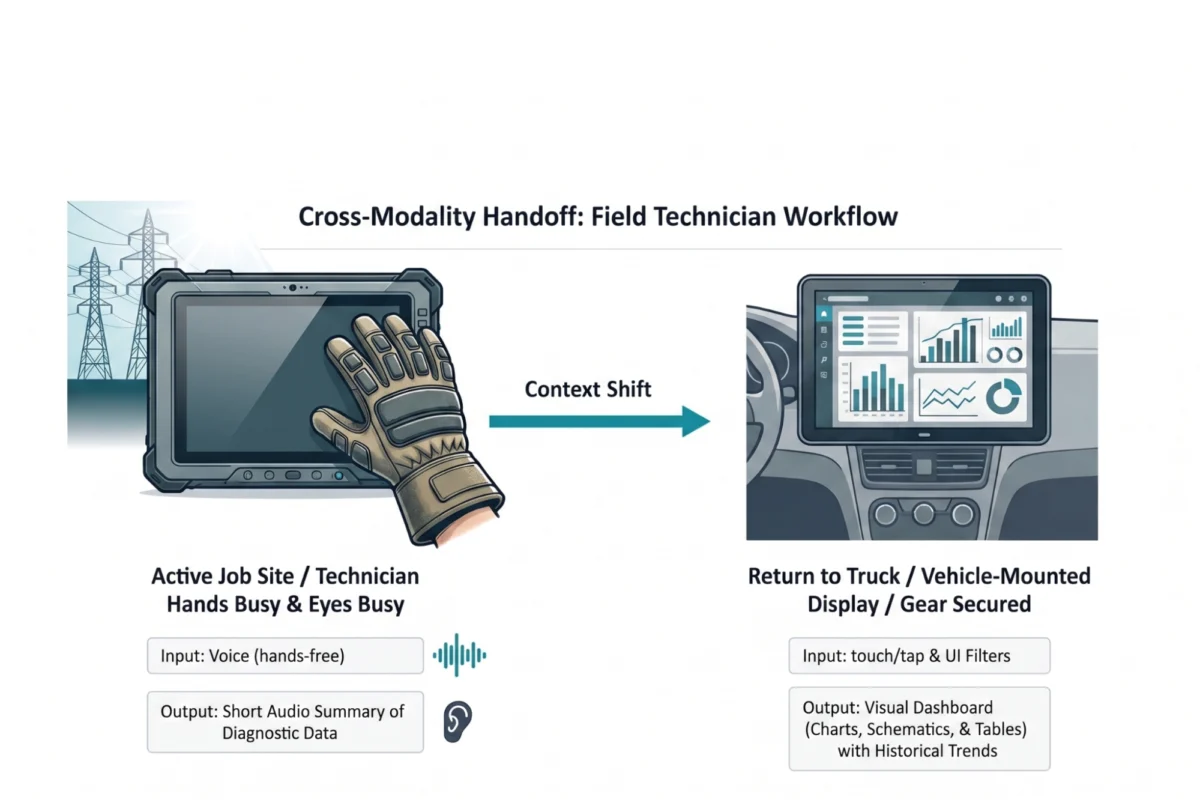
The implications of modality choice are perhaps most visible in industrial and medical sectors. A recent study involving field technicians servicing high-voltage electrical grids highlighted the dangers of conversational tunnel vision. Traditionally, these technicians used ruggedized tablets to access manuals and log data. However, the physical reality of their job—wearing thick protective gloves and working at great heights—made touch-screen interaction nearly impossible.
Furthermore, reading dense text summaries on a screen under direct sunlight created a "cognitive tax" that increased the risk of safety errors. In response, researchers implemented an adaptive modality solution. While on the job site, technicians now use voice commands to query the system, receiving short audio summaries in return. This allows them to maintain situational awareness without looking away from dangerous equipment. Once they return to their vehicle, the system automatically hands off the workflow to a large-mounted dashboard for deep-data review.
This multi-modal approach reportedly reduced diagnostic time by 20% and significantly increased tool adoption among crews who had previously found the AI "more trouble than it was worth."

Industry Reactions and Expert Analysis
The shift toward varied modalities has drawn reactions from across the tech landscape. Software engineers often favor chat interfaces because they are easier to deploy via standard API structures. However, accessibility advocates argue that the industry’s obsession with chat can alienate users with visual or motor impairments if audio and haptic alternatives are not provided.
"The chat window is a powerful tool, but it is just one tool in the toolkit," says a lead UX researcher at a major Silicon Valley firm. "When we force a doctor in a sterile operating room to type into a box to get a patient’s vitals, we haven’t built a smart tool; we’ve built a barrier. The future of AI is ambient—it should meet the user where they are, not demand that they come to a text box."
Supporting data suggests that "glance verification"—the ability to confirm a state in under a second via visual cues—is 300% faster than reading a three-sentence text summary of the same information. This efficiency gain is critical in high-stakes environments like stock trading, emergency response, and air traffic control.
Broader Impact and Future Implications
The move toward contextual modality is expected to have a profound impact on the "Generative AI" market, which is projected to reach over $1.3 trillion by 2032. As companies compete for market share, those that offer the most frictionless user experiences will likely see the highest retention.

For the enterprise, this means a move away from "AI Sidebars" that sit next to existing workflows and toward "Integrated AI" that manifests as smart buttons, predictive sliders, or automated haptic feedback. In healthcare, this could look like an AI that listens to a patient-doctor consultation and automatically populates a structured form, rather than requiring the doctor to "chat" with the system later to summarize the visit.
Ultimately, the goal of AI interface design is to reduce the "psychological tax" of human-machine interaction. By observing actual work environments and aligning modalities to those realities, designers can remove the friction of adaptation. The chat window will remain a vital component for exploratory and creative tasks, but the industry is beginning to realize that for the vast majority of human work, the best interface may be no chat at all.
Conclusion for Designers and Product Leads
To avoid conversational tunnel vision, experts recommend that teams begin their design process away from the screen. A lightweight Task Audit—consisting of field observations, focused interviews, and collaborative workshops—can provide the necessary evidence to justify a non-chat interface. As AI models become more capable, the responsibility falls on designers to ensure that this intelligence is delivered in a way that respects the user’s physical and cognitive state. The future of AI is not just about smarter models; it is about more human interfaces.

