
The rapid proliferation of generative artificial intelligence has led to a fundamental shift in how software products are conceived, moving from a period of "AI-first" experimentation toward a more refined era of "Quiet AI" and seamless integration. As the technology matures, industry experts and user experience (UX) designers are observing a critical disconnect between the surge of new AI-driven tools and the actual needs of the end-user. Rather than seeking additional platforms or complex chat-based interfaces, users are increasingly demanding that AI capabilities be embedded directly into their existing workflows and established mental models. This transition marks a departure from the "shiny object" phase of AI development, focusing instead on addressing high-frequency frustrations through invisible, background-level automation that respects the user’s cognitive load and existing digital habits.
The Shift from AI-First to Utility-Centric Design
Since the public release of large language models (LLMs) in late 2022, the tech industry has been dominated by the "AI-first" mantra. This philosophy often prioritizes the capabilities of the model over the specific needs of the user, resulting in interfaces that require significant behavioral changes. Many of these products force users to navigate terminal-like command lines, engage in lengthy back-and-forth chat interactions, or manage entirely new applications that exist outside their primary workspace.
However, historical UX data suggests that "tool fatigue" is a growing concern in the corporate and creative sectors. According to recent industry reports on SaaS sprawl, the average enterprise employee switches between nearly 35 different applications over a thousand times a day. Adding a standalone AI tool to this mix often exacerbates the problem of context switching. Designers like Vitaly Friedman, creator of "Design Patterns for AI Interfaces," argue that the true value of AI does not emerge from these isolated platforms but from "Quiet AI"—features that sit in the background and assist with repetitive, high-severity tasks without demanding constant attention.
A Chronology of AI Integration Patterns
The evolution of AI user interfaces can be categorized into three distinct phases that have occurred over the last twenty-four months:
- The Chatbot Era (Late 2022 – Mid 2023): Following the success of ChatGPT, most software companies rushed to implement a sidebar chat interface. While useful for general inquiries, this pattern often felt disconnected from the core functionality of the software, requiring users to copy and paste data between the chat window and their actual work.
- The Co-Pilot Era (Late 2023 – Early 2024): Companies began integrating AI as a "co-pilot" or assistant within the application. Examples include GitHub Copilot or AI writing assistants in Notion. While an improvement, these still often require the user to explicitly trigger the AI, maintaining a clear boundary between "manual work" and "AI work."
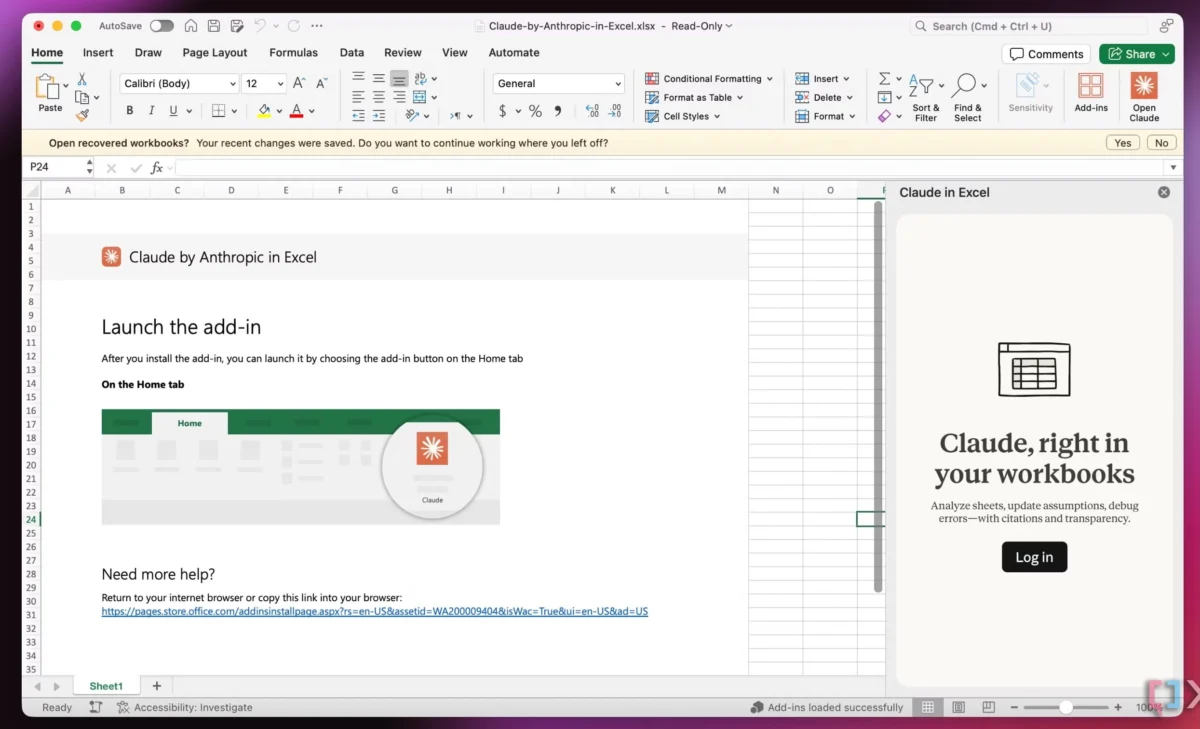
- The Seamless Integration Era (Present): The current frontier involves AI that is so deeply embedded that it ceases to be a "feature" and becomes a fundamental part of the system’s behavior. This is exemplified by integrations like Claude within Microsoft Excel, where the AI studies specific rows or columns in real-time, providing context-aware assistance without the user ever leaving the spreadsheet environment.
Case Study: Folder Instructions and System-Level AI
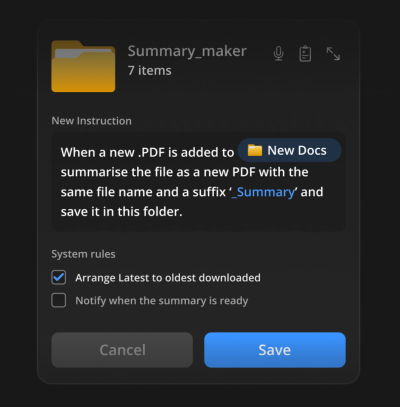
A prominent example of this new philosophy is the concept of "Folder Instructions," a proposal recently highlighted by UX designer Karthikeya GS. This approach moves AI away from the application layer and into the system level—specifically the file management system. In this model, a user does not "use an AI tool" to organize files; instead, they define the intent of a folder, and the operating system’s background AI ensures that intent is met.

For instance, a folder labeled "Passport Application" could be given specific instructions: "Ensure all uploaded documents are in PDF format, rename them to [Date]-[Document Name], and flag any documents that have expired." Once these rules are set, the AI operates locally and silently. This aligns perfectly with the user’s existing mental model of a "folder" as a container for related items, but augments it with automated management.
Other potential applications for folder-level instructions include:
- Automatic Summarization: A folder that automatically generates a one-page executive summary for every PDF dropped into it.
- Invoice Management: A folder that extracts metadata from billing statements and populates a background spreadsheet.
- Media Optimization: A folder for creative assets that automatically converts high-resolution images into web-ready formats upon arrival.
By scoping these actions to a specific folder, developers address one of the most significant hurdles in AI adoption: trust and permissions. Users are often hesitant to give AI access to their entire hard drive, but they are comfortable granting it "locally scoped" permissions within a specific directory.

Supporting Data: The Impact of Context Switching
The push for seamless integration is supported by a wealth of data regarding workplace productivity. Research conducted by the Harvard Business Review indicates that the "toggling tax"—the time lost when switching between different digital tasks—can cost a person up to 40% of their productive time. Furthermore, a study by Okta found that the number of apps deployed by large firms has increased by 18% over the past four years, leading to a state of "digital exhaustion."
In this context, an "AI-first" tool that requires its own tab or window is not a solution but a contributor to the problem. Conversely, Quiet AI that performs tasks where the work is already happening reduces the cognitive load. When AI is integrated into tools like Microsoft Word or PowerPoint, it removes the need for the user to translate their needs into a prompt for a separate application, thereby maintaining the flow state.
Industry Reactions and Expert Analysis
The shift toward integration over isolation has drawn significant reactions from the design community. Vitaly Friedman’s "Design Patterns for AI Interfaces" course has become a focal point for this discussion, emphasizing that AI should be used to reduce frustrations rather than create new workflows. The prevailing sentiment among senior UX researchers is that the most successful AI implementations will be those that users eventually forget are even there.

"AI-first often doesn’t account for the years of small and big design decisions that have shaped user expectations," Friedman notes in his analysis of the current landscape. This observation highlights a common pitfall in modern software development: the assumption that a powerful new technology justifies discarding decades of interface evolution. The "Quiet AI" movement suggests that the future of the web and desktop computing lies in enhancing the interfaces we already know—the folder, the spreadsheet, the document—rather than replacing them with a chat bubble.
Broader Implications for the Future of UX
The move toward seamless, system-level AI has several long-term implications for the tech industry:
1. The Decline of the Standalone App: As AI becomes a utility provided by the operating system or embedded within major suites (like Adobe Creative Cloud or Microsoft 365), the market for standalone "AI wrapper" apps is expected to shrink. Small, single-purpose AI tools will likely be absorbed into the system level.
2. Privacy and Local Processing: To achieve seamless integration at the folder or file level, there is a growing necessity for on-device processing. This shift could prioritize hardware with dedicated AI chips (NPUs), allowing for "Quiet AI" to operate without sending sensitive data to the cloud, thus addressing major privacy concerns.
3. Intent-Based Computing: We are moving away from "procedural computing" (where the user tells the computer every step to take) toward "intent-based computing" (where the user defines the desired outcome). Folder instructions are a primitive version of this future, where the user sets a goal and the system handles the execution.
Conclusion: Delivering Value Without the Burden
The primary goal of software has always been to help users complete tasks with minimal friction. The initial wave of AI products temporarily lost sight of this goal in favor of showcasing the raw power of LLMs. However, the industry is now correcting course. The most impactful AI features of the coming year will not be those that headline major tech conferences with "revolutionary" new interfaces, but those that quietly fix the high-frequency, high-frustration problems within the tools users already use every day.

By focusing on seamless integrations and respecting established mental models, developers can deliver the true value of artificial intelligence: a reduction in the "busy work" of digital life, allowing users to focus on higher-level creative and strategic thinking. As the "Design Patterns for AI Interfaces" curriculum suggests, the ultimate success of AI in UX will be measured not by how much we talk to it, but by how much it does for us without needing to be told.

