
The modern digital landscape is currently witnessing a significant paradigm shift in how software provides value to the end-user. As the initial excitement surrounding generative artificial intelligence begins to mature into a demand for practical utility, a critical realization has emerged among design experts and software engineers: users do not require more tools to manage; they require more effective integrations within the tools they already use. This shift away from "tool sprawl" toward "seamless integration" marks a turning point in user experience (UX) design, where the goal is no longer to introduce a shiny new platform, but to reduce the cognitive load and friction inherent in contemporary digital workflows.
The Paradox of Tool Proliferation and the "Toggle Tax"
For the past decade, the growth of the Software-as-a-Service (SaaS) industry has led to a phenomenon known as tool proliferation. According to industry data from organizations like Okta and BetterCloud, the average enterprise organization now utilizes between 80 and 130 different applications. While each tool is designed to solve a specific problem, the cumulative effect is often detrimental to productivity.
Research published in the Harvard Business Review highlights the "toggle tax"—the time and mental energy lost when a worker switches between different applications. The study found that employees switch between different apps and websites nearly 1,200 times a day, which can result in a loss of up to five weeks of productive time per year. In this context, the introduction of standalone AI chatbots and separate "AI-first" platforms often exacerbates the problem rather than solving it. Users are forced to copy data from a spreadsheet, paste it into a chat interface, prompt the AI, and then manually migrate the output back to the original source. This back-and-forth interaction disrupts established mental models and creates new layers of frustration.
Defining the Shift: AI-First vs. Quiet AI
The industry is currently debating two distinct approaches to implementation: "AI-First" and "Quiet AI." The AI-first philosophy suggests that products should be built from the ground up around the capabilities of large language models (LLMs). While this approach has led to rapid innovation, it often ignores the decades of design evolution that have shaped user expectations. Critics argue that AI-first products frequently overlook the nuance of specific tasks in favor of a generalized chat interface that can be cumbersome for specialized professional work.
In contrast, the concept of "Quiet AI"—a term gaining traction among UX specialists like Vitaly Friedman—proposes that AI should remain largely invisible, operating in the background to assist with repetitive or high-friction tasks. Quiet AI aligns with existing mental models, meaning it does not require the user to learn a new interface or change their fundamental behavior. Instead, the AI "meets the user where they are."

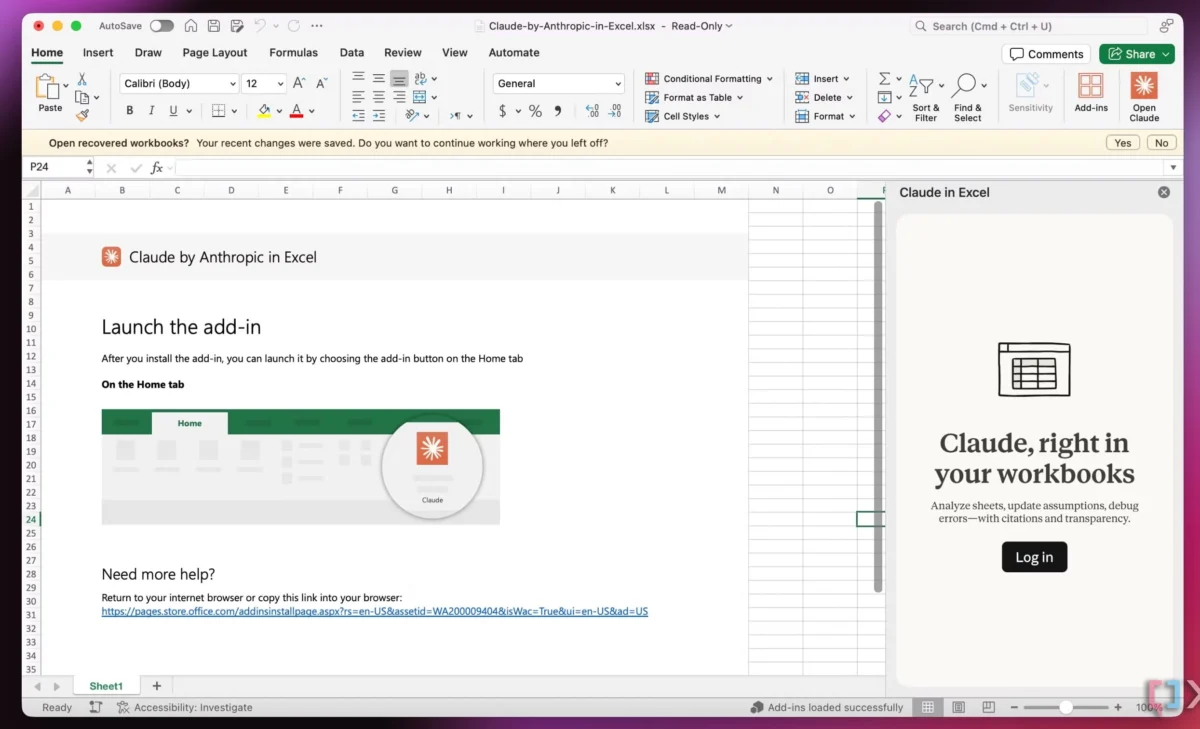
A primary example of this is the recent integration of Anthropic’s Claude into the Microsoft Office suite, including Excel, PowerPoint, and Word. Rather than requiring users to navigate to a separate browser tab, the AI functions as a contextual layer. In Excel, for instance, the AI can analyze specific rows or columns directly within the spreadsheet environment. This integration addresses problems characterized by high frequency and high frustration—such as complex formula generation or data cleaning—without forcing the user to exit their primary workspace.
Chronology of AI Interface Paradigms
To understand the current move toward integration, it is necessary to examine the historical trajectory of human-computer interaction (HCI) as it pertains to automated assistance:
- The Command Line Era (Pre-1980s): Interaction required specialized knowledge and precise syntax. Automation was reserved for those with technical expertise.
- The WIMP Interface (1980s–2010s): Windows, Icons, Menus, and Pointers standardized how users interacted with software. Help systems like Microsoft’s "Clippy" attempted to provide integrated assistance but were often viewed as intrusive due to a lack of contextual intelligence.
- The Chatbot Boom (2022–2023): The release of ChatGPT popularized the conversational interface. While powerful, this era was defined by "context switching," where the AI existed as a separate entity from the user’s actual work.
- The Integration Era (2024–Present): The current phase focuses on "System-Level AI" and "Embedded Intelligence." This involves integrating AI into the operating system and existing application ribbons, where it can observe and assist with tasks in real-time.
System-Level Innovation: The Case for Folder Instructions
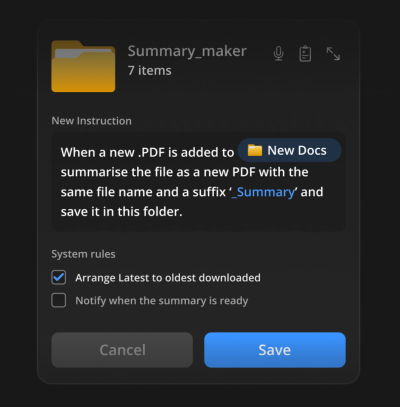
One of the most promising developments in the realm of Quiet AI is the concept of "Folder Instructions," a design proposal championed by UX researcher Karthikeya GS. This concept reimagines the traditional file management system—a staple of computing for over 40 years—as an active participant in the user’s workflow.

In a traditional system, a folder is a passive container. Under the Folder Instructions model, a user can define the purpose and rules of a folder. For example, a folder titled "Passport Application" could be given instructions to automatically identify missing documents, summarize PDF contents, or alert the user if a specific form is nearing an expiration date.
The technical implications of this are significant. By scoping AI actions to a specific folder, the system ensures that permissions and data access are localized. This addresses one of the primary concerns of enterprise AI: data privacy. Instead of granting an AI agent access to an entire hard drive or cloud storage account, the user grants access only to the relevant subdirectory. This creates a seamless integration that respects the user’s existing organizational habits while automating the "low-value" tasks of filing, sorting, and summarizing.
Supporting Data and Industry Reactions
The demand for integrated AI is reflected in recent market performance and corporate strategy. Microsoft’s aggressive rollout of "Copilot" across its ecosystem is a direct response to the need for integrated rather than isolated tools. During a recent earnings call, Microsoft leadership noted that organizations using integrated AI tools saw a 70% increase in user satisfaction regarding task completion speed.

Furthermore, a 2024 survey of 2,000 knowledge workers conducted by Slack’s Workforce Lab found that while 80% of workers believe AI improves their productivity, nearly 50% felt "overwhelmed" by the number of different AI tools they were expected to use. The survey concluded that the most valued AI features were those that automated "the work about work"—such as summarizing meeting notes or organizing files—rather than those that required creative prompting from scratch.
Design leaders are also reacting to this shift by developing new frameworks for AI UX. Vitaly Friedman’s "Design Patterns for AI Interfaces" serves as a contemporary guide for this transition, emphasizing that the most successful AI features are those that solve problems with "high severity and high frequency." The consensus among design professionals is that the "chat bubble" is often a lazy design solution; the more difficult but rewarding task is to weave AI into the buttons, sliders, and menus that users already trust.
Broader Impact and Future Implications
The long-term impact of seamless AI integration extends beyond mere convenience; it represents a fundamental change in the relationship between the user and the operating system. If AI can be integrated into the file system (via Folder Instructions) and the application layer (via Quiet AI), the operating system becomes a proactive assistant rather than a reactive platform.
However, this transition is not without challenges. There are three primary areas of concern that developers and designers must navigate:
- Transparency and Agency: As AI becomes more "quiet" and integrated, there is a risk that it may perform actions without the user’s full awareness. Maintaining a balance between automation and user control is essential to prevent "black box" operations.
- Interoperability: For integration to be truly seamless, different software ecosystems must be able to communicate. The current "walled garden" approach of many tech giants may hinder the development of a truly unified user experience.
- Security and Governance: Integrated AI requires access to sensitive data within the workflow. Ensuring that this data is processed locally or through secure, encrypted channels is a prerequisite for widespread enterprise adoption.
Conclusion: The Path Toward Frictionless Utility
The ultimate value of technology is not measured by the number of features it offers, but by its ability to help users achieve their goals with the least amount of resistance. The current trend toward seamless integration over tool proliferation suggests that the industry is moving away from the "more is better" philosophy of the early SaaS era.
By focusing on Quiet AI, contextual assistance, and system-level enhancements like folder instructions, designers can create environments where the technology serves the user’s mental model, rather than forcing the user to adapt to the technology. As AI continues to evolve, the most successful implementations will likely be those that the user barely notices—tools that do not scream for attention, but silently remove the frustrations and slowdowns of the modern digital life. The future of AI is not a new destination for the user to visit; it is an upgrade to the tools they already use every day.

