
The technology industry has entered a period of conversational tunnel vision. Since the emergence of Large Language Models (LLMs) as the primary engine for digital innovation, a consensus has formed among product teams: the chat bubble is the natural home for every AI capability. Because LLMs are trained on dialogue data, designers have reflexively adopted the conversational user interface (CUI) as the default modality. However, emerging research and user experience (UX) failures suggest that this "one-size-fits-all" approach often ignores the physical and cognitive realities of the end-user. Great UX design is not about forcing users to adapt to the machine’s training data; it is about matching the interface modality to the user’s specific context, intent, and cognitive load.
Modality represents the way a person uses their senses—seeing, hearing, touching, speaking, or typing—to interact with a system. As AI moves from a novelty to a critical tool in enterprise and consumer workflows, the industry is seeing a shift toward multi-modal design. This transition acknowledges that while chat is a powerful tool, it is only one instrument in an expansive toolkit. To build effective AI-powered products, design teams must move beyond the chat-based monolith and adopt a more rigorous framework for modality selection, rooted in task audits and input/output alignment.
The Evolution of Interaction: A Chronology of Interface Design
To understand the current obsession with conversational interfaces, it is necessary to examine the trajectory of human-computer interaction (HCI). The 1970s and 1980s were defined by the Command Line Interface (CLI), which required users to memorize specific syntax. The 1990s ushered in the Graphical User Interface (GUI), which replaced recall with recognition through buttons, menus, and windows. By the 2010s, touch-based interfaces on mobile devices became the dominant modality.
The arrival of sophisticated LLMs in late 2022 marked the beginning of the "Conversational Era." The industry’s rapid pivot to chatbots was driven by the "blank slate" allure of the chat box. Developers saw it as a way to bypass the complex architecture of menus and buttons, assuming that if a system can understand natural language, the user can do anything. However, this has led to what UX experts call "adaptation load"—the psychological tax a person pays when they must change their natural thought processes to accommodate the machine’s preferred method of communication.
The Linguistic Barrier: Why Chat Often Fails as an Input
The assumption that a text box is the most "natural" input method is a prevailing myth in modern design. In reality, a blank chat box often creates choice paralysis. Unlike a GUI, which provides visual cues for available actions, a chat interface forces the user to guess what the AI is capable of doing. This requires the user to translate a vague thought into a specific, well-constructed command—a creative act that adds significant cognitive friction.
Consider the needs of a data analyst. In a traditional GUI, filtering a spreadsheet is a matter of clicking a checkbox. In a conversational interface, that same analyst must suddenly become a writer, describing complex logical filters in complete sentences. Similarly, in creative fields, a designer may know exactly how they want an image to look but struggle to articulate the specific lighting or texture in a text prompt. In these scenarios, a slider, a color picker, or a drag-and-drop interface is objectively superior to a text box.
The Cognitive Cost of Output: Serial vs. Parallel Processing
The limitations of conversational AI are equally evident in how information is presented to the user. When an AI responds with dense blocks of text, it transfers the "interpretive work" back to the human. Text is a serial medium; the human brain must process one word after another to extract meaning. This is efficient for legal analysis or storytelling, but it is highly inefficient for data verification or situational awareness.

Visual formats, such as charts and dashboards, allow for parallel processing. A user can glance at a color-coded map and identify an outlier in milliseconds. When an AI returns a three-paragraph narrative instead of a simple visual indicator, it forces the user into a slow, error-prone extraction process. For professionals in high-stakes environments—such as doctors reviewing vitals or stock traders monitoring price spikes—the "reading assignment" imposed by a chatbot can be more than just an inconvenience; it can lead to critical delays in decision-making.
A Taxonomy of Input and Output Modalities
To avoid the pitfalls of conversational tunnel vision, practitioners require a shared vocabulary for the options available. The following taxonomy categorizes modalities by their cognitive and physical rationale.
Input Modalities
- Button / Tap: Best for single-step, binary actions. It maximizes execution speed and utilizes recognition over recall.
- Voice: Ideal for "hands-busy" or "eyes-busy" contexts, such as driving or field repairs.
- Natural Language Chat: Best for ambiguous or exploratory queries where the user needs to research options.
- GUI (Filters, Sliders, Drag-and-drop): Essential for complex parameter setting or spatial tasks where precision is required.
- Multi-modal (Image + Text): Useful when a user can show the system an object rather than describing it.
Output Modalities
- Push Notification / Alert: Best for time-sensitive, ambient awareness that requires a glance rather than a deep dive.
- Audio Summary: Critical for mobile users or those in environments where looking at a screen is unsafe.
- Visual Dashboard: The gold standard for high-density, comparative analysis and trend detection.
- Interactive Canvas: Best for generative tasks where the user needs to manipulate the output directly.
The Task Audit: A Data-Driven Framework for Design
The selection of a modality should never be based on interface convention; it must be based on evidence. A "Task Audit" is the formal process of gathering data about the physical, social, and cognitive context of the user. This audit focuses on four key areas:
- Physical Constraints: Is the user moving? Are their hands occupied? Is there screen glare?
- Cognitive Load: How much mental energy is the user already spending on their primary task?
- Social Context: Is the user in a quiet office or a loud warehouse? Is privacy a concern?
- Verification Requirements: How high are the stakes if the information is misinterpreted?
Research methods such as contextual inquiry and observation are vital here. Users often forget to mention the small workarounds they have created to deal with poor interfaces. By observing a user in their natural environment, designers can identify "hidden" constraints—such as a technician wearing thick gloves that make a touchscreen unusable.

Case Study: High-Voltage Field Technicians
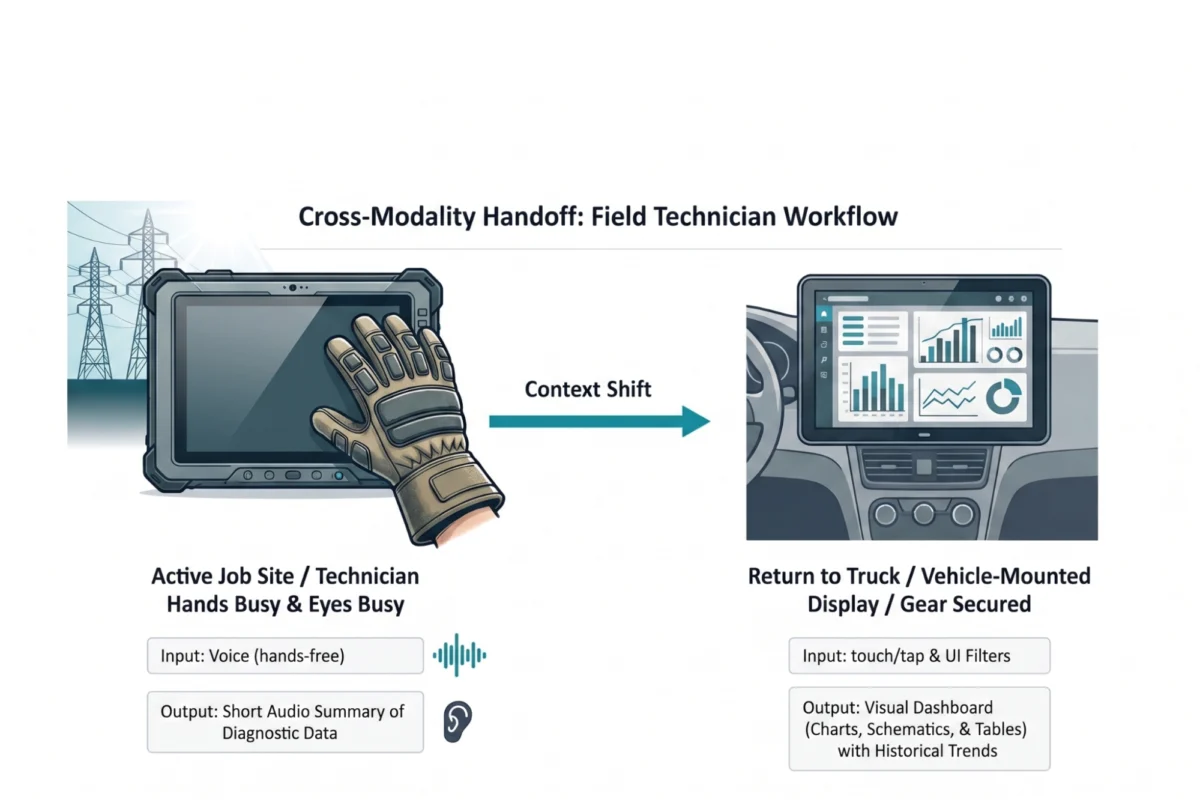
A compelling example of the need for multi-modal design is found in the utilities sector. Field technicians servicing high-voltage electrical grids often work in "hands-busy, eyes-busy" environments. Traditionally, these workers were given ruggedized tablets with form-based interfaces. However, field audits revealed that technicians could not safely use these tablets while high in a bucket truck or while wearing mandatory protective gear.
The solution was an adaptive modality handoff. While on the job site, the technician uses voice input to query the AI and receives short audio summaries for immediate diagnostic data. This allows the technician to keep their eyes on the live wires. Once the technician returns to their vehicle, the system automatically hands off the workflow to a large, vehicle-mounted visual dashboard. This dashboard allows the technician to review complex schematics and historical trends that would be impossible to process via voice or on a small tablet screen.
Industry Implications and the Future of AI UX
The shift away from the "chatbot-only" model has significant implications for the future of enterprise software. Companies that continue to default to chat interfaces risk lower adoption rates and increased user fatigue. Industry analysts suggest that the next wave of AI innovation will not be in the models themselves, but in the "invisible interfaces" that deliver AI capabilities through the right modality at the right time.
Furthermore, accessibility must remain a core tenet of modality selection. While a visual dashboard is efficient for many, it must be paired with audio alternatives for users with visual impairments. A multi-modal approach inherently supports accessibility by providing multiple pathways to information.

The design community must resist the path of least resistance. Building a chatbot is fast and familiar, but building an interface that feels like a natural extension of the user’s workflow is the work that will define the next decade of technology. The future of AI is a diverse ecosystem of visual, vocal, haptic, and ambient interactions, all calibrated to the human experience. In the words of leading UX practitioners, the goal is to fit the modality to the person and the place, ensuring that the technology serves the user, rather than the other way around.

