
The global technology sector has entered a period of what design experts call conversational tunnel vision. As Large Language Models (LLMs) have become the primary engine for digital innovation, the industry has defaulted to the chat bubble as the universal interface for every AI-driven capability. This trend, driven by the fact that LLMs are natively trained on dialogue data, suggests that a text-based conversation is the natural home for artificial intelligence. However, emerging research into user experience (UX) and cognitive load suggests that this "one-size-fits-all" approach is increasingly failing users by ignoring the critical context of their intent, physical environment, and mental bandwidth.
While the chat interface remains a powerful tool for exploratory queries, it is only one modality in an expansive toolkit. Professional UX teams are now advocating for a shift toward multimodal interfaces—systems that adapt to the user’s senses of seeing, hearing, touching, and speaking—rather than forcing the user to adapt to the constraints of a text box. The goal is a seamless alignment where the interface matches the user’s immediate physical and cognitive state.
The Myth of the Universal Chatbot
The rise of the chatbot as the dominant AI interface can be traced to the rapid deployment of generative AI tools following the public release of ChatGPT in late 2022. From a product development standpoint, the chatbot is an attractive "blank slate" that implies a system can handle any request. However, this versatility comes with a significant psychological tax.
Psychologists and UX researchers have identified two primary burdens imposed by text-heavy interfaces: a linguistic challenge for input and a cognitive challenge for output. For input, a blank chat box often triggers "choice paralysis." Unlike traditional graphical user interfaces (GUIs) that provide buttons and menus as visual cues for available actions, a chat box requires the user to recall specific phrasing or technical terms. For a data analyst attempting to filter a complex spreadsheet, describing the logic in a complete sentence is often more labor-intensive than clicking a filter icon.
For output, the burden is even higher. Text is a serial medium, meaning the human brain must process it one word at a time to extract meaning. When an AI provides a dense paragraph to answer a simple status query, it transfers the interpretive work to the user. In high-stakes environments—such as a hospital where a doctor needs a patient’s vitals or a trading floor where a broker needs a price movement—the time required to read and summarize text can lead to errors and dangerous delays.
The Evolution of User Interfaces: A Chronological Context
To understand the current impasse, it is necessary to view the evolution of human-computer interaction (HCI) through a historical lens. The industry has moved through several distinct eras:
- The CLI Era (1960s–1980s): Command Line Interfaces required users to memorize syntax. They were powerful but had a high barrier to entry, accessible only to specialists.
- The GUI Era (1984–Present): The Graphical User Interface, popularized by the Apple Macintosh and later Windows, introduced the "point-and-click" metaphor. This era shifted the burden from memory to recognition, making computing accessible to the masses.
- The NUI Era (2010s–Present): Natural User Interfaces, including touchscreens and basic voice assistants like Siri and Alexa, began incorporating more human-centric modalities.
- The Conversational AI Era (2022–Present): The current phase, dominated by LLMs, has paradoxically reverted some aspects of UX back to the CLI era, where users must once again learn "prompt engineering" to get desired results.
Market data from 2023 and 2024 indicates a growing "AI fatigue" among enterprise users. According to recent industry surveys, while 70% of organizations have experimented with AI chatbots, only a fraction report significant productivity gains in complex workflows. The primary complaint cited is the "friction of interaction"—the effort required to coax the right answer out of a chat-based system.
A Taxonomy of Input and Output Modalities
To move beyond the chatbot, designers are utilizing a more sophisticated taxonomy of interactions. This framework categorizes modalities based on their cognitive and physical rationale.
Input Modalities:

- Buttons and Taps: Best for binary, single-step actions. They maximize execution speed and eliminate the need for linguistic recall.
- Voice: Ideal for "hands-busy, eyes-busy" contexts, such as driving or manual labor, though limited by ambient noise and privacy concerns.
- Natural Language Chat: Reserved for exploratory, ambiguous queries where the user is researching options rather than executing a known task.
- GUIs (Sliders and Drag-and-Drop): Best for spatial tasks like image editing or scheduling, where visual manipulation is more intuitive than verbal description.
Output Modalities:
- Push Notifications: Best for time-sensitive, ambient awareness that requires only a "glance" to verify.
- Visual Dashboards: Essential for high-density, comparative analysis, allowing the brain to process patterns in parallel rather than sequentially.
- Audio Summaries: Necessary for users in motion, delivering information without requiring a break in visual focus.
- Interactive Canvases: Vital for generative tasks, allowing users to manipulate AI-generated content directly.
The Task Audit: An Evidence-Based Design Framework
The selection of these modalities is not a matter of aesthetic preference but of environmental evidence. Product teams are increasingly adopting a "Task Audit" framework to determine the optimal interface. This process involves gathering data on the physical, social, and cognitive context of the work.
The audit focuses on four critical questions:
- What is the state of the user’s hands and eyes? (Are they driving? Are they wearing gloves?)
- What is the ambient environment? (Is it a loud factory floor? A quiet open-plan office?)
- What is the cognitive load? (Is the user performing a high-stakes medical procedure or a low-stakes search?)
- What is the required fidelity? (Does the user need a detailed report or a simple "yes/no" confirmation?)
By using research methods such as contextual inquiry—observing users in their actual workspace—designers can identify "hidden work" and environmental constraints that users might fail to mention in interviews. For instance, a traveler in a crowded airport might struggle with a chat interface because they are carrying luggage and coffee, making typing nearly impossible. In this scenario, a high-contrast visual alert or a voice-activated prompt would be the superior modality.
Case Study: High-Voltage Safety and Adaptive Modality
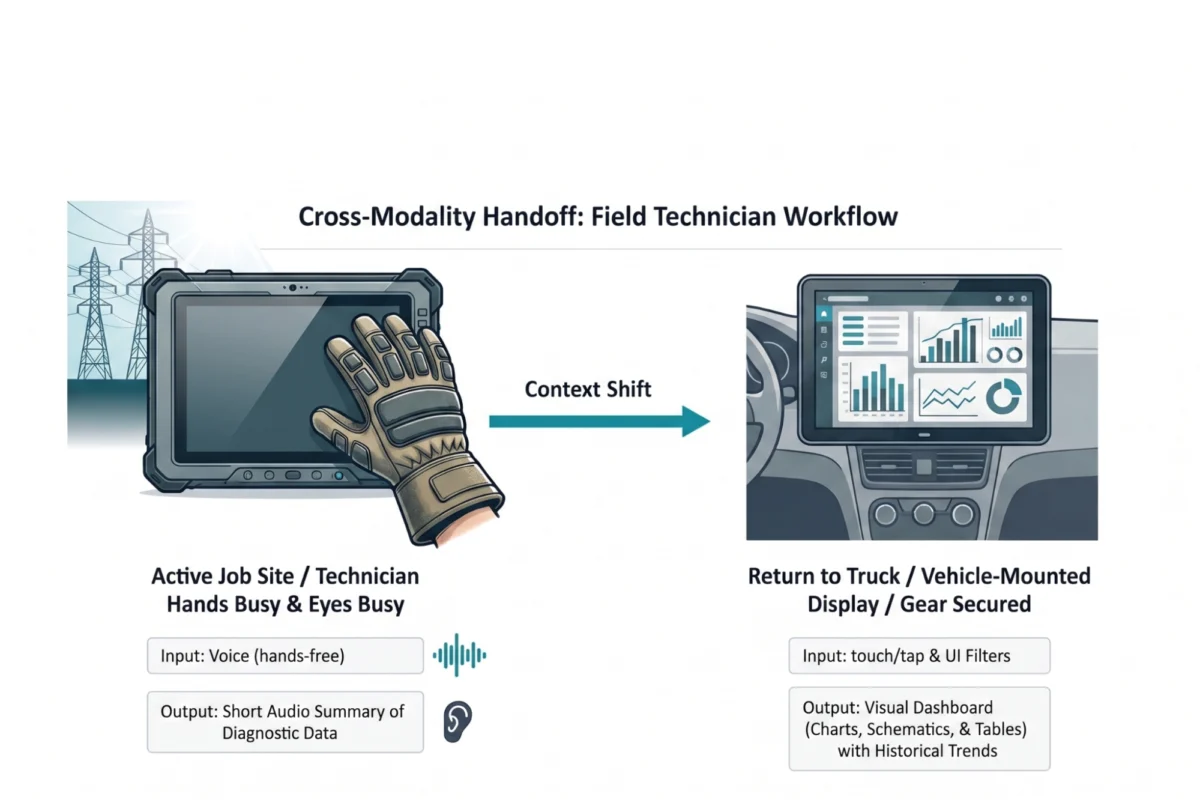
A compelling example of the necessity of multimodal design can be found in the utility sector. Field technicians servicing high-voltage electrical grids operate in one of the most demanding environments for UX.

Traditionally, these technicians used ruggedized tablets to access manuals and log data. However, the physical reality of the job—wearing thick, protective rubber gloves and working in bucket trucks at high altitudes—rendered touchscreens nearly useless. Furthermore, the glare of direct sunlight made reading dense diagnostic text impossible.
A recent overhaul of this system replaced the standard tablet interface with an adaptive, multimodal solution. While on the job site, technicians now use voice commands to query the AI. The system responds with short audio summaries, allowing the technician to keep their eyes on the high-voltage equipment. Once the technician returns to their truck, the system automatically "hands off" the data to a large, vehicle-mounted dashboard. This transition allows for the parallel processing of complex schematics and historical trends that would be impossible to convey via voice or a small screen.
This adaptive approach resulted in a 20% reduction in diagnostic time and a significant increase in safety compliance, proving that the right modality is a matter of operational efficiency, not just convenience.
The Broader Impact on Accessibility and Enterprise Adoption
The shift toward multimodal AI has profound implications for digital accessibility. While a visual dashboard is efficient for many, it is inaccessible to users with visual impairments. A truly robust AI strategy provides multiple pathways to the same information—offering screen-reader-optimized audio alternatives alongside graphical displays.
From a business perspective, the transition away from "conversational tunnel vision" is a competitive necessity. As AI becomes commodified, the primary differentiator for software products will be the quality of the user experience. Companies that continue to package complex capabilities in lazy chat interfaces risk losing users to more intuitive, context-aware competitors.

Future Outlook: Ambient and Haptic Interfaces
Looking ahead, the future of AI interfaces is likely to become increasingly "ambient." We are moving toward an era where AI doesn’t wait for a prompt in a chat box but instead provides proactive, haptic, or visual cues based on the user’s environment. This might include a subtle vibration on a smartwatch to signal a critical data trend or an augmented reality (AR) overlay that highlights a faulty component in a machine.
In conclusion, the industry must resist the urge to default to the chatbot. An AI model is only as valuable as the interface that delivers its insights. By conducting rigorous task audits and aligning input and output modalities with the physical and cognitive realities of the user, designers can create tools that feel like a natural extension of human capability. The chat window is a single tool in a vast ecosystem; the future of AI belongs to interfaces that see, hear, and adapt to the world as we do.

