
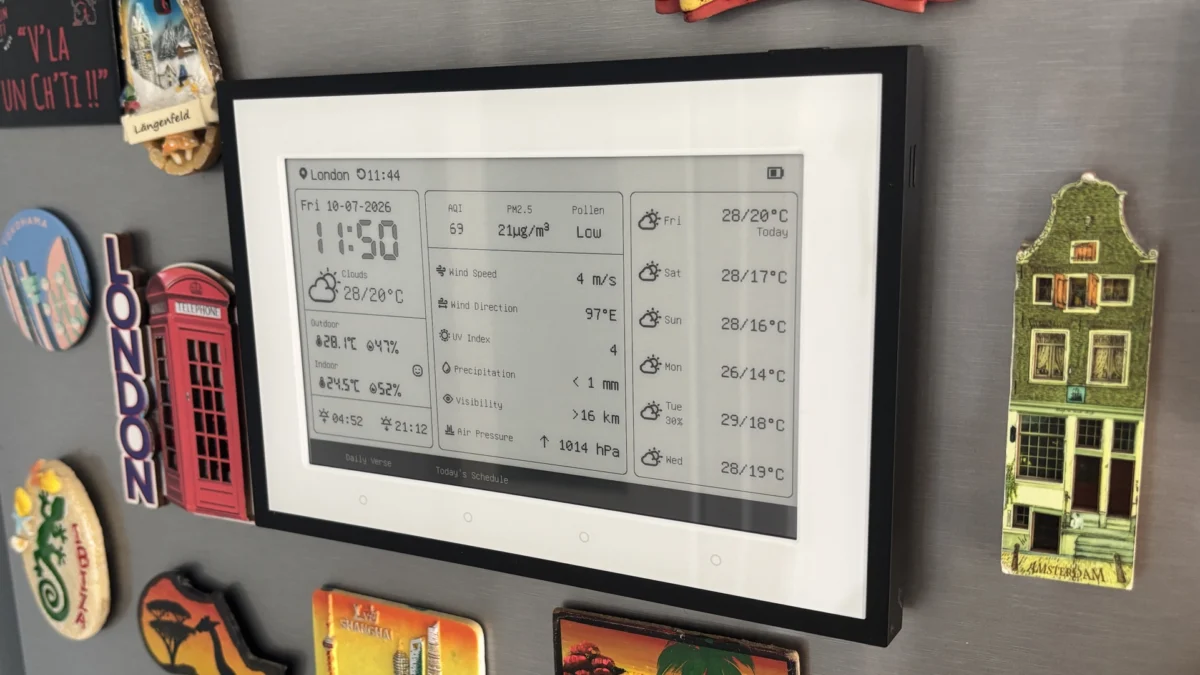
The SwitchBot E-Ink Home Dashboard, a device aiming to consolidate essential home information onto a low-power, unobtrusive display, presents an appealing vision for a more integrated and less intrusive smart home experience. While its E-Ink technology offers exceptional battery life and a subtle aesthetic, the practical implementation is hampered by a software suite that, despite its potential, exhibits noticeable rough edges. From cumbersome calendar integration to clunky navigation and features that feel underdeveloped, the Dashboard’s software experience detracts from the strength of its hardware and concept, making its value proposition a more complex equation for consumers.
A Vision for Ambient Information

The fundamental premise of the SwitchBot E-Ink Home Dashboard is to serve as a central hub for glanceable information, a stark contrast to the often overwhelming and attention-demanding nature of traditional smart displays. Its monochrome E-Ink panel, reminiscent of e-readers, allows it to blend seamlessly into home decor, whether mounted on a wall or placed on a shelf. This design choice is deliberate, aiming to provide users with vital data – weather forecasts, environmental readings, family schedules, and reminders – without the constant glow and potential distraction of a full-color LCD or OLED screen. The device’s ability to operate for months on a single charge further reinforces its "set it and forget it" ethos, a significant advantage in an era of constant device charging.
Hardware Strengths and Design Considerations
The hardware underpinning the E-Ink Home Dashboard is undoubtedly one of its strongest assets. The crisp E-Ink display ensures readability from a distance, a crucial factor for a device intended to be viewed at a glance. The inclusion of a front light enhances visibility in low-light conditions without compromising the screen’s characteristic paper-like appearance. SwitchBot has also thoughtfully included a comprehensive set of accessories to facilitate various placement options. Detachable stand legs allow for desktop or shelf placement, while a wall-mount bracket, complete with adhesive pads and leveling aids, offers a more permanent installation solution. A USB-C charging cable is also provided, ensuring compatibility with modern charging standards.

The initial setup process is streamlined, leveraging the existing SwitchBot app. Users are guided through a simple pairing procedure involving holding a button on the rear of the Dashboard. Once connected, the E-Ink display activates, initiating the setup sequence. Physical controls are minimal yet functional. A top button can be pressed for the front light or held for a forced information refresh, a necessary function given the inherent refresh rate limitations of E-Ink technology. A quick tap of the rear pairing button serves as a convenient shortcut to toggle between Celsius and Fahrenheit temperature units, a small but appreciated usability feature.
Feature Set: Potential and Pitfalls
The core functionality of the E-Ink Home Dashboard revolves around its ability to present a consolidated view of environmental and scheduling data. Out of the box, it can display current weather conditions, temperature and humidity readings (both indoor and outdoor), air quality metrics, and sunrise/sunset times. The interface is designed to be uncluttered, presenting information clearly without overwhelming the user.

SwitchBot offers a range of customizable display modes to cater to different user preferences. These include a "Daily Overview," "Calendar," "Countdown," "Environmental Data," "Daily Verse," and "Custom Text" options, alongside various schedule-focused layouts. While the "Daily Verse" mode provides a touch of personalization, its utility feels somewhat tangential to the device’s primary function as a practical information hub. Fortunately, the shortcut buttons located along the bottom edge of the display can be reconfigured to prioritize more functional views, such as environmental monitoring and calendar displays, which many users are likely to find more beneficial.
The "Custom Text" feature, powered by SwitchBot’s OpenClaw platform, represents a more intriguing and potentially powerful aspect of the Dashboard. This functionality allows users to generate and display bespoke information, such as real-time transport schedules or other text-based data, directly on the E-Ink screen. This opens up possibilities for personalized information feeds that extend beyond the device’s native capabilities.
However, the process of customizing layouts, whether through the SwitchBot app or a browser-based editor, is not as polished as one might expect. The workflow for creating and managing these custom views can be confusing, and the inability to directly assign unique custom displays to individual shortcut buttons introduces a layer of restrictiveness that limits user flexibility.

Navigation also presents a significant hurdle. The absence of a dedicated "home" button means users often find themselves cycling through multiple screens to return to the main dashboard, a process that can become frustrating with frequent use. While weather information is generally well-presented, the default view prioritizes multi-day forecasts over hourly conditions. A dedicated 24-hour forecast screen is available, but it requires additional navigation, which deviates from the ideal of immediate information access.
The inherent nature of E-Ink technology means refresh rates are relatively slow. For users who require up-to-the-minute data, the manual refresh shortcut will likely see frequent use, somewhat undermining the seamless, passive information display that the device aims to achieve.
Calendar Integration: A Cumbersome Hurdle

Calendar functionality is marketed as a headline feature of the E-Ink Home Dashboard, but it is also an area where the device’s limitations become most apparent. Instead of adopting modern, user-friendly account synchronization methods, SwitchBot necessitates a more complex configuration process involving ICS and iCal URLs. While SwitchBot provides detailed walkthroughs and video tutorials to guide users through this process, it remains a significantly more convoluted approach compared to the standard integration methods found in most contemporary smart devices. This technical barrier, though surmountable, adds an unnecessary layer of complexity for users seeking a simple, integrated experience.
Once successfully configured, the Dashboard supports up to five separate calendars and can display up to 30 events per person daily. Switching between different calendars is straightforward, and event synchronization is reported to be reliable. However, the presentation of calendar information remains basic. The default view is limited to today’s appointments, with a three-day schedule view accessible through further button presses. The absence of a true weekly planning screen is a notable omission for a device positioned as a family organizer.
Smart Home Integration: Requiring an Ecosystem Investment

Smart home control on the E-Ink Home Dashboard is facilitated through two configurable scene buttons located at the bottom of the display. Within the SwitchBot ecosystem, these buttons can be programmed to trigger specific devices or execute pre-defined routines. The review indicates successful integration with Home Assistant via Matter, utilizing a SwitchBot Hub Mini, enabling the buttons to launch automations within that platform and Apple Home.
However, the seamlessness of this integration is compromised by a lack of on-screen labeling for scenes triggered by external platforms. If users are activating automations from Home Assistant or Apple Home, they must rely on memory to recall which button corresponds to which action, as scene labels only appear on-screen when automations are created within the SwitchBot app itself.
A significant point of contention is the device’s reliance on an external SwitchBot hub for advanced smart home functionality, including Matter support and broader integration capabilities. The Dashboard itself does not incorporate hub functionality, meaning users who wish to leverage these features must make an additional purchase. This requirement significantly weakens the overall value proposition, as it necessitates a deeper investment into the SwitchBot ecosystem to unlock the device’s full potential. The review suggests that integrating hub functionality directly into the Dashboard would have made the asking price far more justifiable.

Environmental Monitoring: A Standout Feature
Environmental monitoring emerges as one of the E-Ink Home Dashboard’s most compelling strengths. The device features onboard temperature and humidity sensors, but its utility is significantly amplified by its ability to integrate data from up to three compatible SwitchBot environmental sensors. These can include additional temperature, humidity, and CO2 sensors strategically placed throughout the home.
This flexibility allows for comprehensive monitoring of various spaces, such as nurseries, pet rooms, greenhouses, garages, or home offices, all viewable on a single display. The review highlights a practical application where the Dashboard, mounted on a refrigerator (an suboptimal location for accurate room temperature readings), was configured to display data from a SwitchBot Meter Pro located elsewhere in the kitchen, yielding far more reliable environmental insights. The ability to set alert notifications for temperature and humidity thresholds, contingent on the presence of a compatible SwitchBot hub, further enhances its utility as an environmental monitoring tool.

Battery Life: E-Ink’s Enduring Advantage
The inherent power efficiency of E-Ink technology is a significant advantage for the Home Dashboard, and SwitchBot leverages this effectively. The device is equipped with a 5,000mAh internal battery, and SwitchBot claims an impressive operational lifespan of up to 12 months on a single charge when adhering to its default refresh schedule. Based on the review, there is little reason to doubt this claim, positioning the Dashboard as an exceptionally low-maintenance device in terms of power consumption. For users who prefer a permanent installation, continuous power is available via the USB-C port, allowing the device to remain plugged in indefinitely.
Conclusion: A Promising Start with Room for Growth

The SwitchBot E-Ink Home Dashboard is, at its core, a product with an easily likable premise. The display quality is excellent, the environmental monitoring capabilities are genuinely useful, and the overarching concept of ambient, non-intrusive information display holds significant appeal. The ability to access key home data at a glance without the constant presence of another glowing screen is a refreshing departure from the norm.
However, the device’s shortcomings lie in the finer details of its software implementation. The calendar setup process feels antiquated, navigation requires refinement, and several usability features appear to be missing or underdeveloped. More critically, the necessity of purchasing a separate SwitchBot hub to unlock a substantial portion of its smart home functionality significantly dilutes its overall value proposition. Had SwitchBot integrated hub capabilities directly into the Dashboard, its asking price would be far easier to justify.
As it stands, the E-Ink Home Dashboard represents a promising first-generation product with strong hardware foundations and a handful of frustrating software quirks. Existing SwitchBot users, who are already invested in the ecosystem and possess compatible sensors, are likely to derive the most value from this device. For those outside of this user base, it may be prudent to observe the platform’s evolution and potential future software updates before committing to a purchase, hoping that future iterations address the current software-related limitations. The potential for a truly seamless and unobtrusive smart home information hub is present, but it is not yet fully realized in this iteration.

