
The SwitchBot Lock Vision Pro represents a significant advancement in smart home security, offering a robust suite of biometric and conventional unlocking methods designed to provide unparalleled access flexibility and peace of mind. Priced at $229.99, this full deadbolt replacement distinguishes itself with an impressive array of entry options, including highly sophisticated palm-vein scanning, facial recognition, and fingerprint unlocking, alongside traditional methods like PIN codes, NFC, app control, voice commands, and a physical key. After several weeks of rigorous testing, the Lock Vision Pro has demonstrated its capability as a feature-rich and reliable smart lock, though certain aspects, such as the SwitchBot app’s user interface and the current limitations of its Matter implementation, warrant consideration.

Introduction to a New Era of Access Control
Unlike its predecessors, such as the original SwitchBot Lock Pro which retrofits over existing deadbolts, the Lock Vision Pro is a complete deadbolt replacement. This approach necessitates a more involved installation process but allows for the integration of advanced hardware directly into the lock mechanism. The core innovation lies in its multi-modal biometric authentication system. The exterior unit boasts 3D structured-light facial recognition, utilizing an infrared sensor array with over 20,000 points to create a detailed 3D map of the user’s face. This technology is engineered to prevent spoofing attempts using photos or videos, a critical consideration for modern home security.

Complementing the facial recognition are two additional biometric features: contactless palm-vein recognition and a semiconductor fingerprint reader. The palm-vein scanner, a standout feature, employs near-infrared technology to identify the unique vascular patterns within the palm without direct physical contact. This contactless approach offers a hygienic and highly secure method of entry, particularly advantageous in environments where touch-based biometrics might be compromised by moisture or dirt. The inclusion of these diverse biometric options, alongside more conventional methods, aims to cater to a wide range of user preferences and situations, ensuring that access is rarely an issue.
Design and Installation: Balancing Form and Functionality

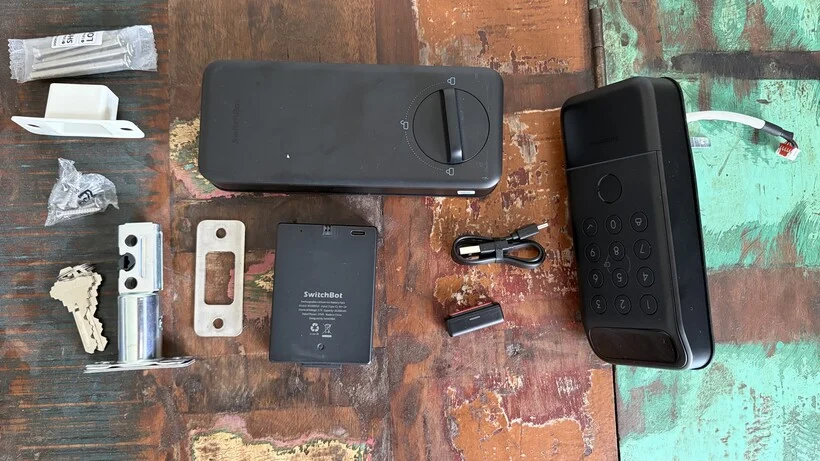
The SwitchBot Lock Vision Pro comes as a complete package, including all necessary hardware for a full deadbolt replacement: the exterior and interior lock units, the new deadbolt mechanism, and a set of physical keys. During the review period, the hardware was observed to be substantial, particularly the exterior unit. While functional, the predominantly plastic construction of the exterior does not immediately convey the premium feel often associated with smart locks in this price bracket. However, the interior structure utilizes a zinc alloy, lending it a more robust and reassuring heft. The exterior unit is rated IP65, offering solid protection against dust and water ingress, which is a crucial feature for an external-facing device.
The interior thumbturn, while operational, is also constructed from plastic and might raise concerns about its long-term durability under significant force. The exterior unit cleverly conceals the keypad, biometric sensors, and a keyway for the supplied physical keys. Internally, the lock features the thumbturn, the main battery compartment housing a substantial 10,000mAh rechargeable unit, and a secondary battery for emergency power.

Installation is presented as a relatively straightforward process for those replacing a compatible deadbolt. The procedure involves removing the existing hardware, fitting the new lock components, routing the connecting cable through the door, and securing everything in place. SwitchBot provides comprehensive installation guides, including full-size templates within the app. However, the reviewer found the company’s short installation video to be a more intuitive resource. The inclusion of strong blue tape to temporarily hold components during installation is a thoughtful touch.
A critical component of the installation is the small magnetic door sensor. This sensor is essential for the lock’s ability to accurately determine if the door is closed, which directly impacts the functionality of features like automatic locking. Once the hardware is physically installed, pairing the lock with the SwitchBot app is a streamlined process. The app guides users through the calibration of both the lock mechanism and the door sensor, followed by the configuration of biometric features and other unlocking methods.

A Multitude of Unlocking Options: Security Tailored to the User
The SwitchBot Lock Vision Pro offers an impressive roster of up to 19 distinct unlocking methods, a feature that stands as its most significant advantage. Users can gain entry via facial recognition, palm-vein scanning, fingerprint, PIN code, NFC (requiring SwitchBot’s separate Wallet Finder Card), the SwitchBot mobile application, voice commands, smartwatch integration, automatic unlocking based on geofencing and Bluetooth proximity, and, of course, a traditional physical key. This extensive selection ensures that virtually every household member can find a convenient and secure method to access their home.

The biometric technologies are particularly noteworthy. The facial recognition system’s reliance on 3D structured light and infrared sensors enhances its accuracy and security compared to traditional camera-based systems. The palm-vein scanner, a more advanced biometric modality, offers a contactless and highly secure alternative, minimizing the potential for biometric data to be compromised or degraded by external factors like moisture.
The setup process for these biometric features is managed through the SwitchBot app and is described as user-friendly. The lock provides audible feedback during setup and operation, confirming the success of biometric scans. The system allows for the registration of permanent credentials, as well as temporary and emergency access codes, offering considerable flexibility for managing guest access and household member permissions without the need to duplicate physical keys.

It is important to note that the Lock Vision Pro does not support phone-based digital keys via Aliro or UWB (Ultra-Wideband) technology. The NFC functionality is dependent on the purchase of a separate SwitchBot Wallet Finder Card.
Automatic locking features are configurable in two primary modes. The standard auto-lock function relies on the door sensor to confirm closure before initiating a countdown to re-locking. Alternatively, a timer-based re-lock option will secure the bolt after a predetermined period, irrespective of the door’s state. The sensor-based auto-lock is generally considered more practical for everyday use, preventing accidental lockouts while the door is still ajar.

The auto-unlock feature intelligently combines geofencing with Bluetooth. This system requires the user’s phone to leave a designated area and then re-enter it before the feature is activated. Bluetooth proximity then confirms the user’s closeness to the lock, initiating the unlocking sequence. This layered approach aims to balance convenience with security, preventing unintended unlocks.
Battery performance has been a strong point during testing. The primary 10,000mAh rechargeable battery is quoted to last up to 12 months under specified usage conditions. A secondary CR123A backup battery provides approximately 500 emergency unlocks. In the event of both batteries being depleted, a USB-C port located on the bottom of the lock can supply temporary power, allowing the device to wake up and be unlocked. This port is designated for emergency power, not for charging the main battery.

The Lock Vision Pro supports Matter over Wi-Fi, a significant advantage for smart home integration. This allows the lock to be incorporated into compatible Matter ecosystems, such as Apple Home, Google Home, Amazon Alexa, Samsung SmartThings, Home Assistant, and Homey, without the need for a dedicated SwitchBot hub for Matter control. The setup involves configuring the lock within the SwitchBot app first, and then using the Matter setup code found on the interior unit to pair it with a chosen Matter controller. While this integration enables basic control and status monitoring of the lock across different platforms, more advanced features, such as biometric registration and the management of temporary guest codes, remain exclusively accessible through the SwitchBot app.
Performance in Real-World Scenarios

The true test of any smart lock lies in its performance, and the SwitchBot Lock Vision Pro excels in its primary function: providing reliable and swift access. The biometric unlocking capabilities are particularly impressive. Face recognition is consistently fast and accurate, even in low-light conditions. The 3D structured-light system’s anti-spoofing measures are a valuable security enhancement, although direct testing of these measures was outside the scope of a typical user review.
The palm scanner has proven to be exceptionally effective. Its contactless nature is a significant advantage, and its reliability has been superior to fingerprint unlocking, especially in adverse weather conditions. Fingerprint sensors can often struggle with damp or wet fingers, whereas the palm reader has maintained consistent performance in scenarios where a conventional fingerprint sensor might falter.

The sheer volume of unlocking options is not merely a marketing point; it translates into genuine utility. The ability to seamlessly switch between biometric methods, PIN codes, app control, NFC, and other options without encountering significant reliability issues underscores the lock’s versatility.
However, the SwitchBot app, while functional, could benefit from a more intuitive user interface. Managing the various credentials and settings can sometimes feel clunky, and an improvement in the app’s design would undoubtedly enhance the overall user experience.

The Matter integration, while functional, is currently limited in scope. While it’s beneficial to control and monitor the lock from a broader smart home platform, and the response times observed with Home Assistant and Apple Home have been commendable, the full spectrum of advanced features is still tied to the SwitchBot ecosystem.
Battery performance has been reassuring throughout the testing period. The dual-battery system, comprising a large rechargeable unit and a backup battery, provides multiple layers of protection against power loss. The emergency USB-C power connection further enhances this resilience.

Final Verdict and Market Position
The SwitchBot Lock Vision Pro emerges as a highly capable smart deadbolt, with its most compelling attribute being the sheer diversity of access methods it offers. The palm-vein scanner stands out as a particularly innovative and effective solution, offering speed, reliability, and a contactless advantage, especially beneficial in damp conditions. Facial recognition is also well-executed, and the combination of fingerprint scanning and conventional methods ensures that various users can be accommodated with personalized access.

This comprehensive approach to access makes the Lock Vision Pro an ideal choice for family households, where individual preferences for unlocking methods can vary widely. It eliminates the need for every member to carry a smartphone or rely on remembering complex PIN codes.
While the Matter integration could be more expansive, and the SwitchBot app could benefit from a design overhaul, these are areas for potential future improvement. The absence of Aliro and UWB means it misses out on some of the latest contactless digital key technologies found on competing products. Furthermore, the exterior’s plastic construction, while functional, slightly detracts from the premium feel expected at its $229.99 price point.

Despite these minor drawbacks, the SwitchBot Lock Vision Pro delivers substantial value. For users prioritizing advanced biometric authentication and a wide array of alternative entry options, this smart deadbolt presents a compelling and highly recommendable solution for enhancing home security and convenience. Its robust performance and thoughtful feature set position it strongly in the competitive smart lock market, particularly for those seeking flexibility and cutting-edge technology.

