
The landscape of web styling is undergoing a significant transition as the World Wide Web Consortium (W3C) introduces the corner-shape property, a long-awaited addition to the CSS Borders and Box Decorations Module Level 4. For nearly two decades, web developers have relied almost exclusively on the border-radius property to soften the edges of digital interfaces. While revolutionary at its inception, border-radius has remained limited to a single geometric outcome: the circular arc. The emergence of corner-shape marks a departure from this limitation, providing a native CSS solution for complex geometries including bevels, scoops, notches, and the highly sought-after "squircle."
This development addresses a persistent pain point in front-end engineering. Until recently, achieving any corner style other than a standard curve required resource-heavy workarounds such as SVG masks, complex clip-path polygons, or fragile background-image hacks. These methods often resulted in "brittle" code where borders failed to follow the clipped edges, shadows were inadvertently cut off, and responsiveness was compromised. The introduction of corner-shape allows these styles to be integrated directly into the CSS box model, ensuring that outlines, shadows, and backgrounds respect the declared geometry of the element.
A Chronology of Corner Styling: From Images to Native Geometry
To understand the impact of the corner-shape property, one must examine the evolution of container styling since the early days of the commercial internet. In the late 1990s and early 2000s, "rounded corners" were a hallmark of sophisticated web design but were notoriously difficult to implement. Developers were forced to use nested tables and four distinct corner images, a technique that increased HTTP requests and made maintenance a nightmare.

By 2005, the industry shifted toward "sliding doors" and other CSS sprite techniques, yet these still relied on external assets. The turning point arrived around 2010 when border-radius achieved widespread support across major browsers, including Internet Explorer 9. This property simplified development overnight, but it also standardized the "rounded" look of the web for the next 15 years.
The timeline leading to the current state of corner-shape reflects a growing demand for editorial-grade design on the web:

- 2010-2015: The "Flat Design" era prioritizes simple rounded corners and sharp edges.
- 2016-2020: The rise of mobile OS design languages, particularly Apple’s iOS, popularizes the "squircle" (a superellipse curve), leading developers to seek ways to replicate these smoother transitions on the web.
- 2021-2024: Advanced CSS modules begin exploring more granular control over box decorations.
- March 2026: Chrome 139+ officially implements the
corner-shapeproperty, allowing Chromium-based browsers to render advanced corner geometries natively.
Technical Specifications and Syntax
The corner-shape property serves as a modifier to the existing border-radius property. It does not function independently; rather, it dictates the mathematical path taken by the radius. If an element has no border-radius defined, the corner-shape remains invisible. This symbiotic relationship ensures that the property fits seamlessly into existing design systems.
The property currently supports several key keywords:

- Round: The default value, maintaining the standard circular arc.
- Bevel: Creates a straight, diagonal cut at the corner, ideal for faceted or "gem-like" UI elements.
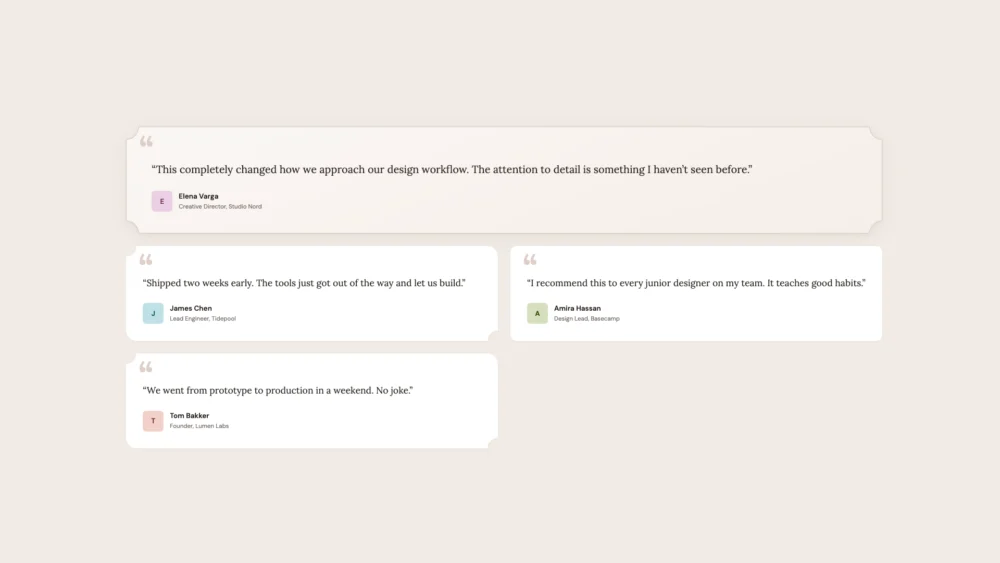
- Scoop: Produces a concave, inward-facing curve, often used in ticket-stub designs or editorial layouts.
- Notch: Results in a sharp, rectangular inward cut, providing a mechanical or "industrial" aesthetic.
- Squircle: Implements a superellipse curve that provides a smoother transition between the straight edge of the element and the corner.
Furthermore, the introduction of the superellipse() function allows for even more precise control. By providing a numeric parameter, developers can fine-tune the curvature between a sharp bevel (0) and a standard circle (1), or even go beyond to create ultra-smooth transitions. The property also supports individual corner declarations, such as corner-shape: bevel round scoop squircle;, following the standard clockwise shorthand used throughout CSS.
The Strategy of Progressive Enhancement
As of the first quarter of 2026, browser support for corner-shape is concentrated within the Chromium ecosystem, including Google Chrome, Microsoft Edge, and Opera. While Firefox and Safari have yet to finalize their implementations, the property is widely regarded as a prime candidate for progressive enhancement.

In a professional development environment, this involves a "two-tier" design approach. The foundational layer uses standard border-radius and proven techniques to ensure a functional and attractive UI for all users. The "enhanced" layer, wrapped in @supports queries, applies corner-shape styles for users on modern browsers.
Industry experts argue that this approach is superior to using fallback banners or JavaScript polyfills. By treating advanced shapes as a "bonus" rather than a requirement, developers can push the boundaries of design without alienating users on older platforms. This mirrors the transition period of border-radius itself, where many websites featured square corners in Internet Explorer while providing rounded edges to Firefox users.

Practical UI Applications and Case Studies
The versatility of corner-shape is best demonstrated through common UI components. In e-commerce, the property allows for "ribbon" badges on product cards. By using a combination of round and bevel values, a badge can appear to point toward the center of the card, creating a directional visual cue that was previously only possible with complex SVG polygons.
In SaaS (Software as a Service) platforms, corner-shape can be used to establish visual hierarchy. For example, a "Most Popular" pricing plan might utilize scoop corners to stand out from neighboring plans that use standard squircle edges. This use of shape as a tool for emphasis—rather than just decoration—represents a significant shift in interface design.

Media players and mobile-first web applications also benefit significantly. The "squircle" value is particularly effective for album art and app icons, as it mimics the organic curves found in high-end hardware design. Unlike clip-path, which can leave jagged edges or interfere with sub-pixel rendering, native CSS corner shapes maintain high-fidelity anti-aliasing across all screen resolutions.
Industry Impact and Performance Analysis
From a performance standpoint, the move toward native CSS shapes is a clear win for web optimization. Relying on SVG masks or large background images increases the "weight" of a page and can lead to Layout Shift (CLS) if assets load slowly. Native CSS properties are handled by the browser’s rendering engine with minimal overhead.

Moreover, accessibility and maintainability are improved. When a developer uses clip-path to create a beveled button, they often find that the focus ring (outline) does not follow the clipped shape, creating a confusing experience for keyboard users. Because corner-shape modifies the box model itself, the browser’s native focus indicators and box-shadows automatically adapt to the new geometry.
Preliminary feedback from the developer community suggests that this property will significantly reduce the complexity of design system CSS. "We are looking at a reduction of hundreds of lines of code in our component library," says one senior front-end architect. "What used to require a dedicated SVG component for a ‘notched’ card is now a single line of CSS."

Broader Implications for the Future of Web Design
The arrival of corner-shape is likely a precursor to even more advanced box-decoration properties. Specifications for border-shape are already being discussed, which could allow for even more radical departures from the rectangular grid.
As the web continues to evolve from a document-sharing platform into a sophisticated medium for brand expression, the ability to control geometry at a granular level becomes essential. The corner-shape property represents a maturation of CSS, moving away from the "hacks" of the past and toward a future where the only limit to interface design is the imagination of the creator, rather than the limitations of the box model.

In conclusion, while the property is currently in its early stages of adoption, its impact on the "look and feel" of the web will be profound. By providing a native, performant, and accessible way to define the edges of our digital world, the W3C has given developers a powerful new tool in the ongoing quest to bridge the gap between static design and the fluid, interactive reality of the modern web.

