
The rapid integration of agentic artificial intelligence into enterprise and consumer workflows has exposed a critical flaw in traditional user interface design: the reliance on legacy latency indicators that fail to communicate the complexities of machine reasoning. As AI systems transition from passive tools to autonomous agents capable of multi-step decision-making, the standard "spinner" or progress bar is increasingly viewed as a barrier to user trust. Industry experts and interface designers are now advocating for a fundamental shift toward transparency patterns that reveal the system’s internal processes, status updates, and decision-making logic in real-time.
The Evolution of Latency Indicators: From Bandwidth to Reasoning
For over three decades, interface design has operated under a technical paradigm where delays were primarily a function of bandwidth or file size. The "throbber" or spinning wheel, popularized during the early days of the web, served a simple purpose: to reassure the user that the system had not crashed while fetching data. However, the emergence of agentic AI—systems that "think" by weighing options, browsing the web, and executing API calls—introduces a new category of wait time.
When an AI agent pauses for twenty seconds, it is often engaged in compute-intensive reasoning rather than simple data retrieval. Using a generic loading icon for this period creates "transparency debt," where the user is left uncertain whether the system is performing a complex task or has entered an infinite loop. Recent user experience (UX) research suggests that without granular feedback, users experience heightened anxiety, leading to premature task abandonment or a total loss of confidence in the AI’s output.

The Decision Node Audit: Mapping Transparency Requirements
To address this, design teams are implementing what is known as a "Decision Node Audit." This process involves mapping the internal logic of an AI system to identify specific moments where the agent makes probabilistic choices. By identifying these nodes, engineers and designers can create a "Transparency Matrix" that dictates when a behind-the-scenes action requires a visible status update.
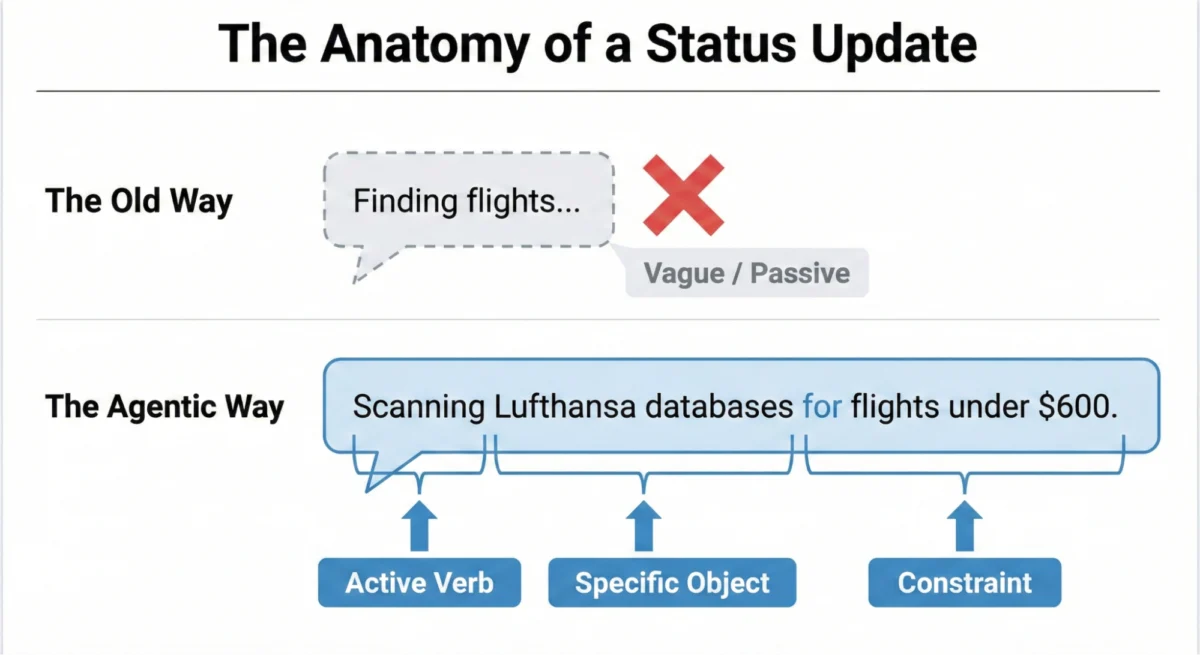
The objective is to move away from generic placeholders like "Loading" or "Working." These terms, remnants of static software architecture, are being replaced by a specific linguistic formula: Action Word + Specific Item + Constraints. For instance, a travel agent AI should not merely state it is "Searching for flights." Instead, a high-transparency update would read: "Scanning five airline databases for non-stop flights under $600." This approach confirms to the user that the agent has understood the parameters of the request and is operating within established boundaries.

A Taxonomy of Agentic Interface Patterns
As the industry matures, a library of standardized interface patterns for AI transparency is beginning to emerge. These patterns are categorized by the level of risk and the user’s need for information.
1. The Living Breadcrumb
Designed for low-stakes, background tasks, the Living Breadcrumb provides subtle, non-disruptive feedback. In applications such as AI-assisted email drafting, a small, pulsing indicator might transition between states like "Reading context," "Drafting reply," and "Refining tone." This pattern offers quiet assurance that the task is progressing without demanding the user’s full attention, making it ideal for multitasking environments.

2. The Dynamic Checklist
For high-stakes workflows, such as financial transfers or database migrations, the Dynamic Checklist serves as a process anchor. Unlike a progress bar, which provides a vague percentage of completion, the checklist enumerates every planned step. It marks preceding steps as complete, highlights the current action, and lists future actions as pending. This pattern is particularly effective at managing unpredictable time; if a specific step, such as "Verifying account routing," takes longer than expected, the user can see exactly where the delay is occurring, which naturally increases patience and trust.
3. The Thinking Toggle
Expert users often require deeper insights into an AI’s logic. The Thinking Toggle is a progressive disclosure control—often a "View Logs" button—that allows users to expand a friendly status message into a raw terminal view. This view displays sanitized logic logs, such as "Confidence score: 0.89" or "Cross-referencing Source A with Source B." While most users may never access this feature, its presence serves as a "trust signal," indicating that the system has nothing to hide.

4. The Persistent Audit Trail
Real-time transparency is often missed if a user steps away from their screen. The Audit Trail provides "trust after the fact" by allowing users to replay the decision logic on a final result screen. This "Show Work" interaction acts as a digital receipt, enabling users to verify the validity of the output and spot-check for hallucinations or errors.
Handling Partial Success and Tool Disentanglement
A significant challenge in agentic AI is the "grey area" of partial success. In traditional software, tasks typically result in a binary outcome: success or failure. Agentic workflows, however, may complete 90% of a task while failing at a single sub-task, such as an AI travel agent booking a flight but failing to secure a specific restaurant reservation.

Journalistic analysis of current AI failures suggests that binary error messages—such as "Request Failed"—are trust-killers. Modern design requires more granular error reporting that highlights what worked and what didn’t. Furthermore, designers must "disentangle" the tool from the agent. If an AI fails because an external API (like Google Calendar) is down, the interface must explicitly state that the failure was due to the external service, rather than a lack of competence on the part of the AI agent itself.
Enterprise Implications: The Attention Gap and Professional Adoption
In professional settings, the "Attention Gap" presents a unique hurdle. Experts, such as insurance underwriters or financial analysts, often tune out the interface while an AI processes a task. Research indicates that these users judge the system almost entirely on the final result. If the output aligns with their expert expectations, trust is reinforced. However, if the output is unexpected, and the explanation for that output has disappeared along with the real-time progress bar, the user is likely to abandon the tool and revert to manual methods.

This "manual rework" is a primary barrier to AI adoption in the enterprise. The Audit Trail becomes essential here, providing the persistent transparency needed for an expert to investigate a discrepancy without having to re-run the entire query. For enterprise AI to be viewed as a "colleague" rather than a "black box," it must provide the same level of accountability and communication expected from a human team member.
Technical and Security Considerations
Implementing high-transparency interfaces is not merely a design challenge; it is a full-stack requirement. Dynamic checklists require robust front-end state management systems capable of listening for back-end webhooks triggered by step-completion events.

Moreover, transparency introduces security risks. When exposing "Thinking Toggles" or raw logs, developers must implement strict sanitization protocols to prevent the accidental exposure of proprietary business logic, internal data structures, or security tokens. True transparency is built through honest communication, not through the exposure of system vulnerabilities.
Timeline of UI Transparency Evolution
- 1990s: The rise of static progress bars and simple "Hourglass" icons for local file processing.
- 2000s: Introduction of "Throbbers" and indeterminate spinners for web-based data fetching.
- 2010s: Skeleton screens become the standard for mobile and SaaS applications to simulate instant loading.
- 2023: The "LLM Boom" highlights the inadequacy of spinners for long-form text generation and "thinking" time.
- 2025 (Projected): Standardization of agentic UI patterns, with a focus on audit trails, dynamic checklists, and "reasoning" transparency as mandated by emerging global AI regulations.
Conclusion: Predictability as the Ultimate Product
The transition from "magic trick" AI to "colleague" AI depends entirely on the industry’s ability to move beyond misdirection and hidden mechanics. By adopting practical interface patterns that prioritize specific updates, acknowledge partial wins, and provide persistent audit trails, developers can transform the user experience from one of passive observation to active collaboration.

In the emerging landscape of agentic workflows, the "product" is no longer just the final output; it is the predictability, reliability, and understanding of the process itself. Transparency, delivered at the right moment and in the right container, is the only mechanism capable of turning the anxiety of waiting into a moment of informed confidence.

