
The global software industry is currently navigating a critical transition point where the sheer volume of standalone productivity tools has begun to yield diminishing returns for the end-user. For the past decade, the prevailing philosophy in software development was "there’s an app for that," leading to a fragmented ecosystem where the average enterprise employee now toggles between nearly 30 different applications and windows daily. However, recent shifts in user experience (UX) design and the integration of Large Language Models (LLMs) suggest that the future of digital productivity lies not in the creation of more tools, but in the seamless, "quiet" integration of advanced capabilities into existing workflows. This movement prioritizes established mental models over the novelty of "AI-first" platforms, signaling a move toward invisible innovation that addresses high-frequency, high-frustration tasks without requiring users to learn entirely new interfaces.
The Crisis of Tool Proliferation and the Toggle Tax
As the digital workplace has matured, the primary obstacle to productivity is no longer a lack of capability, but the cognitive burden of context switching. Research from the Harvard Business Review and various productivity analysts has identified what is now known as the "toggle tax." Data indicates that the average person switches between different apps and websites nearly 1,200 times a day. This constant jumping between interfaces results in a significant loss of "flow state," with studies suggesting that it can take up to 23 minutes for a worker to fully regain focus after a distraction or a complex context switch.
The emergence of generative AI in 2022 initially exacerbated this problem. Hundreds of new startups launched standalone "AI-first" wrappers, requiring users to copy data out of their primary workspace (such as a spreadsheet or document), paste it into a separate chat interface, refine the output, and then move it back. While the AI’s output was often impressive, the friction of the workflow limited its long-term utility. Modern UX experts now argue that users do not want more destinations; they want the capabilities of those destinations to be present where they already work.
From AI-First to Quiet AI: A Strategic Pivot
The software industry is witnessing a ideological split between "AI-first" and "Quiet AI" philosophies. AI-first products are built around the engine of artificial intelligence, often featuring a dominant chat interface or a "command-line-first" approach. While these tools are powerful for developers and power users, they frequently disregard decades of established design decisions that have shaped user expectations.
In contrast, "Quiet AI" refers to features that reside in the background, assisting with repetitive tasks without demanding constant attention. These integrations align with "Jakob’s Law," a principle of UX design which states that users spend most of their time on other sites and apps, and they prefer your app to work the same way as all the others they already know. By embedding AI into the menus and folders users already navigate, companies like Microsoft, Anthropic, and Google are attempting to lower the barrier to entry.

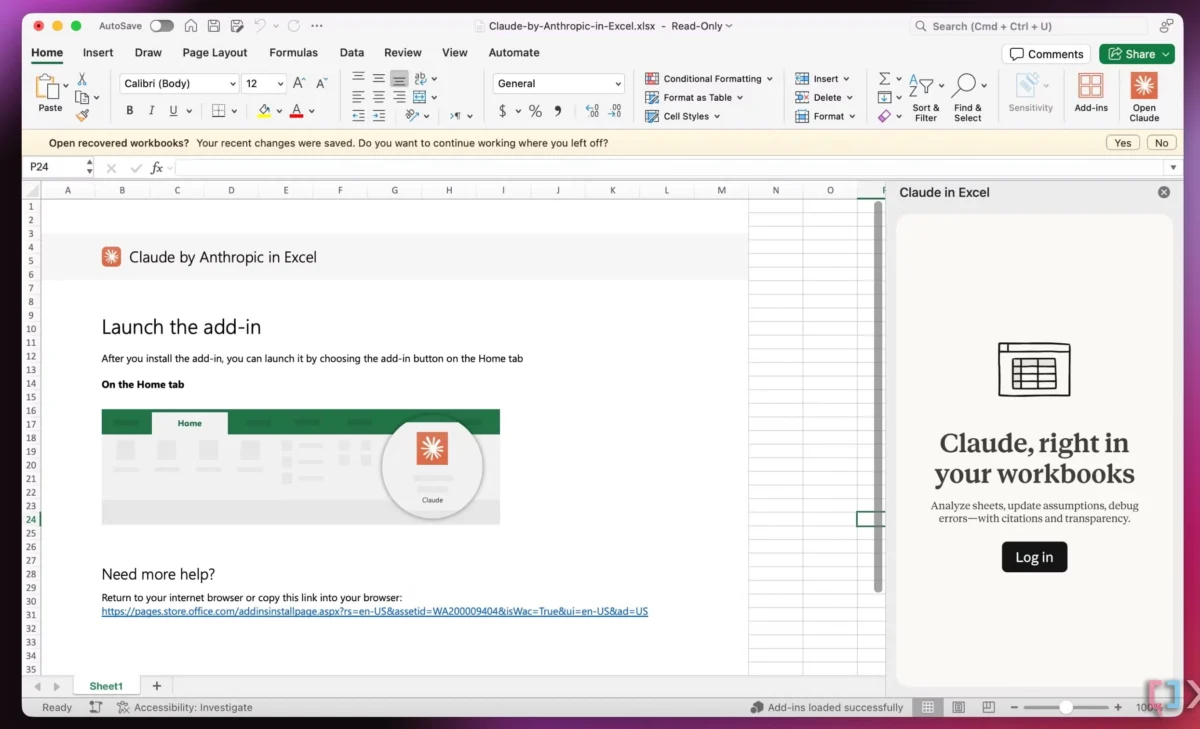
A primary example of this shift is the integration of Claude AI within the Microsoft Office suite. Rather than forcing a financial analyst to leave Excel to summarize a data trend, the integration allows the AI to "read" specific rows or columns in situ. This preserves the user’s mental model of the spreadsheet while automating the high-effort task of data interpretation.
Case Study: Folder Instructions and System-Level AI
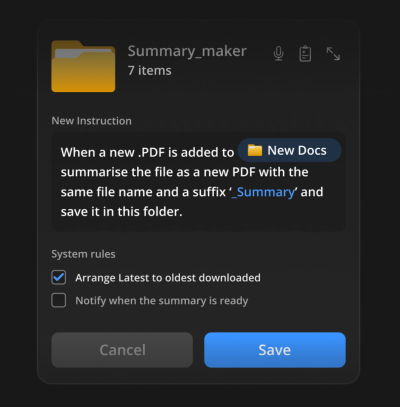
One of the most significant conceptual leaps in seamless integration is the proposal for "Folder Instructions" at the operating system level. Proposed by design researchers such as Karthikeya GS, this concept suggests that the traditional file folder—a mental model that has existed since the early days of the Graphical User Interface (GUI)—can be transformed into an active agent.
Under this model, a user could assign specific "instructions" to a folder. For instance, a folder labeled "Passport Application" could be programmed to automatically identify missing documents, summarize the requirements from uploaded PDFs, and flag expiration dates. This moves the AI away from a central "oracle" that the user must visit and toward a localized utility that functions within the existing file management hierarchy.

Technical and Security Implications of Localized AI
The move toward folder-level AI also addresses critical concerns regarding data privacy and system permissions. By scoping AI actions to specific folders, developers can create "permission sandboxes."
- Local Scoping: The AI only interacts with the data the user has explicitly placed within a specific directory.
- Reduced Latency: Localized instructions can often be processed by smaller, faster on-device models, reducing the need for constant cloud communication.
- Intent-Based Automation: Users define the "intent" of a folder once, and the system follows those rules indefinitely, reducing the need for repetitive prompting.
The Evolution of User Interface Chronology
To understand the current trajectory, it is necessary to look at the chronology of human-computer interaction:
- 1970s-1980s (Command Line Era): Users had to learn specific syntax to interact with computers. This was powerful but had a high barrier to entry.
- 1990s-2010s (GUI Era): The introduction of folders, icons, and menus democratized computing by using physical metaphors (the "desktop").
- 2010s-2022 (SaaS Explosion): The rise of cloud computing led to a massive increase in specialized, standalone web applications.
- 2023-Present (The Integration Era): The realization that "app fatigue" is a bottleneck, leading to the current trend of embedding smart features into the GUI metaphors of the 1990s.
Industry Reactions and Expert Analysis
Vitaly Friedman, a prominent figure in the UX design community and creator of "Design Patterns for AI Interfaces," has emphasized that the value of AI is not found in the technology itself, but in its ability to reduce "friction points." Friedman argues that the most successful AI implementations of the next five years will be those that users barely notice.

"User value doesn’t emerge from having to juggle between multiple applications," Friedman notes in his analysis of design patterns. Instead, value is generated by reducing the "high severity, high frequency" frustrations that plague daily digital tasks. This sentiment is echoed across the industry, as major players move away from flashy AI demos toward practical, "invisible" features like smart email sorting, automated calendar scheduling, and context-aware file organization.
Broader Impact and the Future of Software Design
The shift toward seamless integration has profound implications for the software economy. If the most valuable features are those integrated into existing platforms, the "moat" for new startups becomes significantly harder to build. The advantage shifts back to incumbents who own the "surface area" where users spend their time—namely operating systems (Windows, macOS, iOS) and core productivity suites (Google Workspace, Microsoft 365).
However, this also opens a new frontier for "middleware" and "plugin" architectures. We are likely to see a decline in the "destination web" and a rise in "agentic services" that plug into the user’s existing environment.
Key Takeaways for the Future of UX:
- Mental Model Preservation: Successful tools will adapt to the user, rather than forcing the user to adapt to the tool.
- Reduction of Cognitive Load: The primary metric of success will shift from "time spent in app" to "tasks completed with minimal friction."
- Localized Intelligence: Privacy and efficiency will drive AI toward system-level, locally-scoped integrations rather than centralized, all-knowing chatbots.
In conclusion, the era of the "shiny new tool" is being eclipsed by the era of the "useful feature." As users grow weary of managing a fragmented digital life, the industry’s focus is rightly shifting toward creating a cohesive, integrated experience. By leveraging existing mental models like folders and spreadsheets and imbuing them with "Quiet AI," designers are finally addressing the root causes of user frustration, paving the way for a more efficient and less intrusive relationship with technology.

