
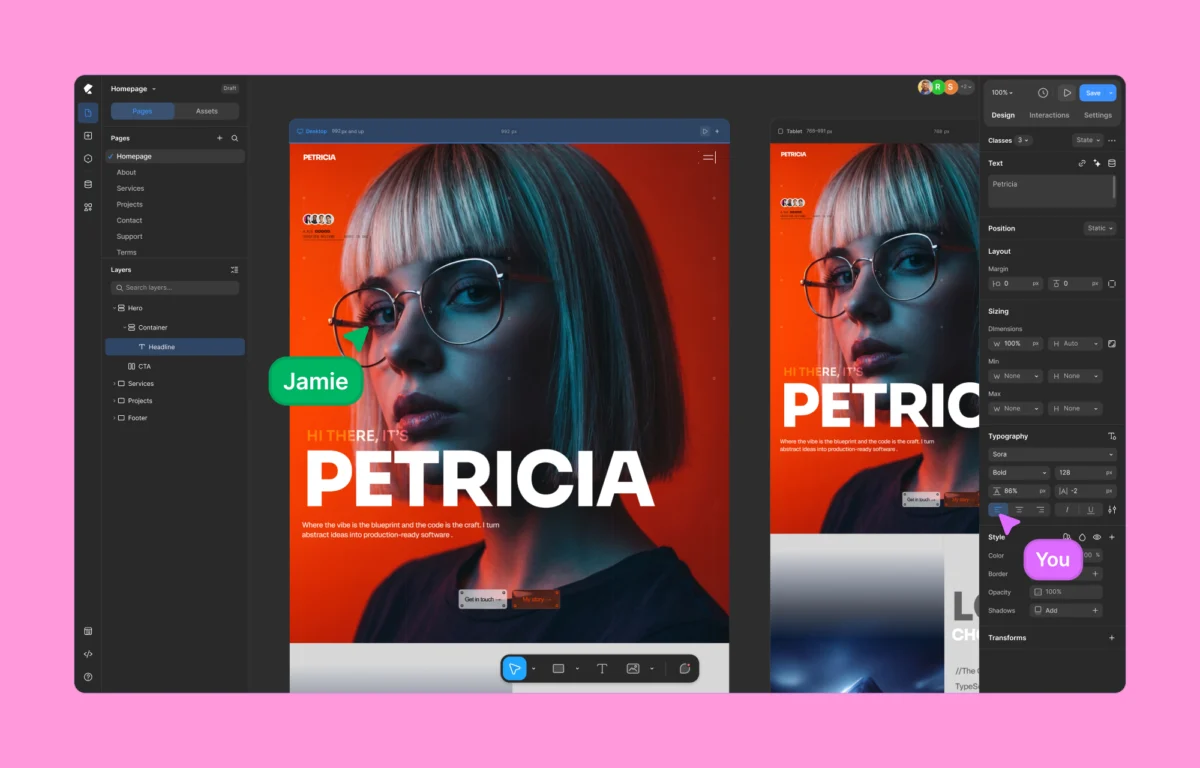
The landscape of web development within the WordPress ecosystem is undergoing a fundamental shift as new technologies move away from the traditional, rigid "box-model" layout that has defined the platform for nearly two decades. At the forefront of this evolution is Kirki, a visual website builder that introduces a freeform infinite canvas to the world’s most popular content management system (CMS). By prioritizing performance-optimized code and eliminating the industry-standard reliance on third-party plugins, Kirki aims to bridge the gap between high-end design tools like Figma and the functional reality of a live WordPress environment.
For years, the WordPress page-building market has been dominated by legacy tools that utilize a "row-and-column" architecture. While these tools democratized web design for non-developers, they often introduced significant technical debt, including bloated HTML structures, excessive CSS files, and a phenomenon known as "div-itis"—the nesting of dozens of unnecessary containers to achieve a single layout effect. Kirki’s arrival marks a departure from these constraints, offering a workflow more akin to modern SaaS design platforms while maintaining the self-hosted flexibility of WordPress.
The Evolution of WordPress Site Construction
To understand the impact of Kirki, it is necessary to examine the chronology of WordPress design. In the early 2010s, site customization was largely limited to the WordPress Customizer and shortcode-based builders. This era was followed by the rise of "drag-and-drop" builders like Elementor and Beaver Builder, which introduced visual editing but at a heavy cost to site speed and server resources.

By 2018, the introduction of the Gutenberg block editor attempted to modernize the experience, yet many professional designers found the block-based system too restrictive for high-end creative projects. This created a market void for a "freeform" builder—one that allows elements to be placed anywhere on a canvas without being tethered to a linear vertical flow. Kirki has positioned itself as the solution to this specific demand, providing a spatial design environment that operates on an infinite plane, allowing for overlapping elements, complex layering, and non-traditional layouts that were previously only possible through custom CSS or specialized platforms like Webflow.
Technical Performance and Benchmarking Data
In a series of performance audits conducted under controlled conditions, Kirki has demonstrated a measurable advantage over legacy builders in terms of core web vitals and DOM (Document Object Model) efficiency. Performance is no longer a luxury in the modern web; it is a critical factor for Search Engine Optimization (SEO) and user retention.

During benchmarking tests using the Google Lighthouse audit tool on a standard WordPress installation (using the Twenty Twenty-Five theme), researchers compared identical layouts built in Kirki and Elementor. The findings revealed that Kirki generated a significantly cleaner code output. While traditional builders often produced DOM depths exceeding 15 to 20 levels of nested elements for a simple hero section, Kirki’s output remained streamlined, often reducing the total number of HTML nodes by 40% to 60%.
The impact on load times was equally pronounced. Sites built with Kirki showed lower Largest Contentful Paint (LCP) scores and reduced blocking time, largely due to the builder’s "zero-dependency" philosophy. Unlike many competitors that require a suite of additional plugins for forms, pop-ups, and dynamic content, Kirki integrates these features natively. This prevents the "plugin bloat" that typically results in dozens of extra JavaScript and CSS requests per page load.

The Infinite Canvas and Design Workflow
The centerpiece of the Kirki experience is the infinite canvas. In traditional builders, the user is restricted to a 1:1 preview of the page they are currently editing. Kirki’s canvas allows designers to pan, zoom, and organize multiple responsive views—Desktop, Tablet, and Mobile—side-by-side.
This "concurrent editing" capability addresses one of the most persistent pain points in responsive web design. In standard workflows, a designer must toggle between different viewports to check for layout breaks. In Kirki, a change made to the desktop version can be monitored across all breakpoints simultaneously. Furthermore, the system utilizes a cascading style logic, where modifications to larger screen sizes intelligently flow down to smaller ones, while still allowing for breakpoint-specific overrides.

For design teams, this workflow is bolstered by a native Figma-to-WordPress handoff tool. As Figma has become the industry standard for UI/UX prototyping, the transition from "design" to "code" has historically been a manual and error-prone process. Kirki’s import functionality allows for the direct translation of Figma layers into functional WordPress elements, preserving design fidelity and reducing development time by an estimated 50% for complex layouts.
Native Dynamic Content and CMS Integration
A recurring criticism of visual builders is their inability to handle complex data structures without third-party help. Typically, WordPress developers rely on Advanced Custom Fields (ACF) or similar plugins to manage dynamic data. Kirki integrates a comprehensive Dynamic Content Manager directly into its core.

This native integration allows users to map design elements to WordPress metadata, custom post types, and taxonomies without leaving the visual editor. Whether a site is pulling data for a real estate listing, a portfolio gallery, or a dynamic news feed, the connection is handled through a visual interface. This architectural choice not only simplifies the backend but also ensures that the dynamic data is rendered using the same optimized code paths as the rest of the site, maintaining high performance across data-heavy pages.
Collaborative Environments and Multi-User Editing
In an industry first for WordPress builders, Kirki has introduced real-time co-editing features. Historically, WordPress has been a single-user editing environment; if two users attempted to edit the same page, one would be locked out to prevent data conflicts. Kirki’s multi-user system mirrors the collaborative nature of Google Docs or Figma.

Live cursors allow team members to see exactly where their colleagues are working on the canvas. Changes appear in real-time, and a built-in commenting system allows for feedback to be pinned to specific design elements. This feature is particularly relevant for agencies and large-scale enterprises where designers, copywriters, and developers must collaborate on a single page simultaneously. By removing the "edit-lock" bottleneck, Kirki facilitates a more agile production cycle.
Pricing Structure and Market Accessibility
The economic model of Kirki reflects a strategy of transparency in a market often criticized for "subscription fatigue." The builder offers a robust free version available via the WordPress.org repository, which provides the core infinite canvas experience without "paywalling" essential design tools.

For professional use, Kirki’s Pro plans are positioned aggressively against competitors. The Starter plan, priced at approximately $59 per year, includes all premium features, including the pop-up builder, form manager, and dynamic content tools. Notably, Kirki offers a Lifetime plan for a one-time payment of $499, a rarity among modern SaaS-style builders. This pricing model appeals to freelancers and agencies looking to stabilize their long-term overhead costs by avoiding recurring annual fees for every site in their portfolio.
Quality Control and Pre-Publication Auditing
To ensure that the freedom of the infinite canvas does not lead to technical errors, Kirki includes a built-in Page Audit tool. This quality control mechanism scans the page for common SEO and accessibility issues before it goes live. The audit checks for:

- Missing Alt text on images
- Broken internal and external links
- Improper heading structures (H1-H6 hierarchy)
- Mobile responsiveness conflicts
- Excessive file sizes that could impact performance
By integrating these checks into the builder itself, Kirki empowers designers—who may not have deep technical backgrounds—to ship websites that meet modern web standards for accessibility and search visibility.
Broader Impact and Industry Implications
The emergence of Kirki represents a broader trend toward "low-code" and "no-code" solutions that do not sacrifice technical excellence. For the WordPress community, it serves as a response to the rising popularity of closed-ecosystem builders like Webflow and Framer. By bringing a similar level of design sophistication to WordPress, Kirki allows users to remain within the open-source ecosystem while enjoying the UI/UX benefits of modern design software.

Industry analysts suggest that the move toward infinite canvas builders will force legacy players to reconsider their UI/UX. As user expectations shift toward more fluid, visual-first environments, the "boxed" builders of the past may find it increasingly difficult to compete for the attention of the next generation of web designers.
In conclusion, Kirki is not merely another plugin; it is a reimagining of how WordPress can function as a design tool. By combining the creative freedom of an infinite canvas with the technical rigor of optimized code and the collaborative power of real-time editing, it offers a compelling vision for the future of web construction. Whether for a solo freelancer or a high-volume agency, the platform provides the tools necessary to build fast, beautiful, and scalable websites without the compromises that have long plagued the WordPress ecosystem.

