
The rapid proliferation of Large Language Model (LLM) interfaces across the digital landscape has fundamentally altered how users interact with information, yet this technological shift risks creating a significant digital divide for individuals with disabilities. As chat-based patterns become the primary gateway for productivity tools, search engines, and creative platforms, the necessity of making these "immersive" experiences accessible has moved from a secondary consideration to a core functional requirement. Industry experts, including digital accessibility specialist Eric Bailey, are now highlighting critical frameworks and technical implementations required to ensure that the AI revolution does not exclude the millions of users who rely on assistive technologies such as screen readers, refreshable braille displays, and keyboard-only navigation.
The Definition and Scope of Immersive AI Interfaces
In the current tech ecosystem, an "immersive LLM chat experience" refers to full-screen, dedicated web or native applications designed primarily for back-and-forth dialogue with an artificial intelligence agent. High-profile examples include OpenAI’s ChatGPT, Anthropic’s Claude, Google’s Gemini, and developer-focused tools like GitHub Copilot. Unlike simple pop-up support bots or inline text generation widgets, these platforms serve as comprehensive workspaces where users manage complex queries, long-running projects, and vast amounts of data.
These experiences are typically built using web technologies—even when delivered as desktop or mobile applications—frequently utilizing frameworks like Electron or Tauri. This reliance on web standards means that the Web Content Accessibility Guidelines (WCAG) remain the definitive benchmark for compliance. However, the dynamic, streaming nature of LLM responses introduces unique challenges that traditional static web pages do not face. Exclusion in this context represents a multifaceted loss for the user: a loss of educational opportunity, a reduction in employability, and a barrier to the essential utility that AI now provides in modern professional environments.
The Chronology of Digital Accessibility in the AI Era
The journey toward accessible AI interfaces has followed a compressed timeline compared to the broader web. In the early 2020s, the initial "AI gold rush" focused almost exclusively on model performance and speed, often at the expense of user interface (UI) standards. By 2023, as tools like ChatGPT reached hundreds of millions of users, advocacy groups and inclusive design researchers began identifying systemic barriers in how these tools communicated with screen readers.
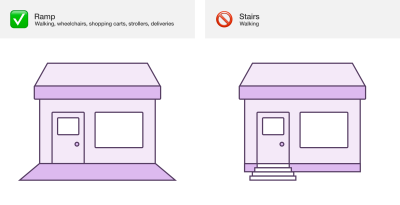
Historically, the transition from command-line interfaces to graphical user interfaces (GUIs) in the 1980s and 90s initially marginalized blind users until screen reading technology caught up. Accessibility experts warn that a similar "reset" is occurring with LLMs. If the industry fails to standardize accessible chat patterns now, they risk bake-in exclusionary habits that will take decades to remediate. The current phase of development, characterized by the "reframing" of chat UIs as interactive built environments, seeks to apply the social model of disability—the idea that disability is a mismatch between a person and their environment—to the digital realm.
Technical Frameworks: Solving the Visual Bias
A significant hurdle in LLM design is "visual bias," where developers unconsciously assume all users can see the real-time updates on a screen. For a sighted user, the appearance of a new message or the "streaming" of text (where words appear one by one) provides immediate feedback. For a screen reader user, this content is often invisible unless specific programmatic triggers are implemented.
Live Region Implementation and the Streaming Challenge
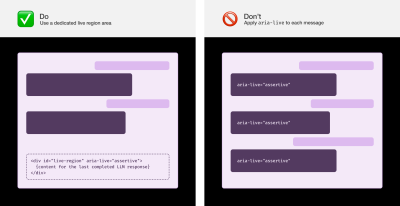
The primary tool for bridging this gap is the ARIA (Accessible Rich Internet Applications) live region. A live region allows developers to announce changes to the page without moving the user’s keyboard focus. However, the implementation is nuanced. Experts advise against applying aria-live attributes to every individual message, as this can lead to unstable or "juddering" announcements that are difficult to parse.
Instead, the industry standard is shifting toward using a dedicated, visually hidden live region area placed at the end of the Document Object Model (DOM). Furthermore, the common practice of streaming text—while visually engaging—can be a nightmare for assistive technology. The recommended approach is to wait until the LLM has completed its entire response before triggering a full, coherent announcement. This ensures that the user receives a complete thought rather than a fragmented series of character updates.
Communicating Latency and Processing States
LLMs are rarely instantaneous. There is often a "thinking" phase where the model processes a prompt. Visually, this is usually represented by a pulsing icon or a "typing" animation. To provide an equivalent experience, developers must trigger live region announcements that inform the user that their request is being processed.
Data from inclusive user research suggests that a "sweet spot" for these announcements is a five-second interval. If a response takes longer than five seconds, a simple "Loading" or "Thinking" announcement should fire, potentially repeating every few seconds to reassure the user that the application hasn’t crashed. This prevents the "silence barrier," where a user is left wondering if their submission was successful.
Navigation and Structural Integrity
Navigating a long conversation history is another area where standard web patterns often fail. In a typical chat interface, messages are visually aligned (e.g., user on the right, AI on the left). To replicate this context for non-visual users, the implementation of invisible headings and landmarks is essential.
The Role of Visually Hidden Headings
Inserting a visually hidden heading (such as an H2 or H3) before each message allows screen reader users to jump between parts of the conversation using standard shortcut keys. These headings should clearly identify the speaker—for example, "You said" or "Claude said." This provides a structural "map" of the dialogue, allowing users to quickly revisit previous prompts or responses without having to read through the entire thread linearly.
Landmark Regions and Skip Links
Landmark roles (such as main, nav, form, and aside) help define the large-scale layout of the app. For immersive chats, this usually includes a sidebar for conversation history, a main area for the current chat, and a form area for the input field. However, designers are cautioned not to over-use these roles. Wrapping every single message in a section or region landmark can "pollute" the landmark list, making it harder for users to find the primary navigation points.
To further enhance efficiency, "skip links" should be provided. These are internal page links that allow keyboard users to bypass repetitive content (like a long sidebar of past chats) and jump directly to the latest response or the input field.
Advanced Interaction: Composite Widgets and F6 Navigation
As these tools become more complex, they require more sophisticated keyboard interaction models. One such model is the "composite widget" for conversation lists. By treating a list of past chats as a single interactive unit, developers can allow users to "Tab" into the list once and then use arrow keys to navigate between items. This significantly reduces the number of keystrokes required, a critical consideration for users with motor disabilities who may find excessive tabbing fatiguing or painful.
Furthermore, some accessibility advocates suggest reviving older navigation techniques, such as "F6 navigation." Historically used in Windows desktop applications, pressing F6 allows a user to cycle focus between major panes of an application. Implementing this via JavaScript event listeners in a web-based LLM chat can provide a "pro-user" experience for long-term assistive technology users, allowing them to hop from the prompt input to the AI output and back with minimal effort.
Customization and User Agency
The diverse needs of the disability community mean that a "one size fits all" interface is rarely effective. Personalization is a cornerstone of accessible design. Experts recommend that LLM platforms provide a suite of accessibility preferences, including:
- Announcement Granularity: Allowing users to toggle which types of updates are announced. For instance, a developer might want to hear every "tool call" or "file search" the AI performs, while a casual user might only want the final answer.
- Animation Control: Providing a global toggle to disable "streaming" text and transition animations. This is vital for users with vestibular disorders or ADHD, for whom constant movement can be a major distraction or trigger for motion sickness.
- Sound Toggles: Allowing users to mute app-specific "ping" sounds without muting their entire system, ensuring that notification sounds do not interfere with the voice of their screen reader.
- Re-bindable Shortcuts: Ensuring that any built-in keyboard shortcuts do not conflict with the existing shortcuts of assistive software or different international keyboard layouts.
Broader Impact and Legal Implications
The push for accessible AI is not merely a matter of ethical design; it is increasingly a legal necessity. In the United States, the Americans with Disabilities Act (ADA) has been interpreted by the Department of Justice to apply to web-based services. In the European Union, the European Accessibility Act (EAA) sets a 2025 deadline for many digital services to meet strict accessibility standards. Companies that fail to integrate these "immersive" accessibility patterns risk significant legal exposure.
Beyond compliance, the business case for inclusive AI is compelling. Features designed for accessibility often benefit all users—a phenomenon known as the "curb-cut effect." For example, the ability to turn off streaming text can help users on slow internet connections, and clear structural headings help search engines index content more effectively.
As LLMs continue to evolve from novelties into essential infrastructure, the implementation of these practical, technical strategies will determine whether the future of technology is truly universal. By centering the lived experiences of disabled users and moving beyond "baseline compliance" toward genuine usability, developers can ensure that the transformative power of AI is available to everyone, regardless of how they interact with a screen.

