
The modernization of legacy software systems remains one of the most significant hurdles for contemporary enterprises, as these aging platforms continue to serve as the critical infrastructure for daily global operations. Often described as "black boxes," these systems—some nearly a decade or more in age—function as slow, unreliable, yet indispensable components of the corporate landscape. While the temptation to undergo a total digital overhaul is high, the reality of enterprise technology requires a more nuanced, strategic approach to user experience (UX) design. Improving the UX of a legacy system is not merely a matter of aesthetic refinement; it is an exercise in technical archaeology, risk management, and stakeholder alignment.
The Economic and Operational Reality of Legacy Software
In the modern corporate environment, legacy systems are rarely candidates for immediate deprecation. Instead, they are frequently the "heart" of the business, having been heavily customized over years to meet specific organizational requirements. Industry data suggests that large enterprises often allocate between 40% and 60% of their total IT resources—including time, budget, and personnel—simply to managing, maintaining, and fine-tuning these legacy frameworks.
The cost of total replacement is often prohibitive. For instance, in the retail sector, replacing proprietary point-of-sale (POS) systems across thousands of physical locations involves hardware logistics and staff retraining costs that can reach hundreds of millions of dollars. Consequently, these systems must co-exist with modern digital products. This creates what designers call a "Frankenstein" ecosystem: a patchwork of modern user interfaces (UI) layered over antiquated back-end processing. This fragmentation often results in critical UX failures, where modern workflows are suddenly interrupted by decade-old error messages, slow data processing, or non-responsive layouts.

A Chronology of Systemic Decay and UX Debt
To understand how to fix a legacy system, one must first understand the timeline of its evolution. UX debt is rarely the result of a single poor decision; rather, it is an accumulation of factors over time.
- Phase I: The Bespoke Build (Years 0–3): The system is originally developed, often by an external supplier or a specific internal team, to solve a niche problem. Documentation is usually adequate, and the UI reflects contemporary standards.
- Phase II: The Patchwork Era (Years 4–6): Business needs shift. Fast-paced decisions lead to "quick fixes" and the addition of features that were never part of the original architecture. The original developers begin to leave the company, taking institutional knowledge with them.
- Phase III: The Black Box Stage (Years 7–10): The system becomes a "black box." Current staff know that it works but are unsure exactly how. Design tools used for the original interface become discontinued, and the system becomes a bottleneck for new integrations.
- Phase IV: Critical Obsolescence (Year 10+): The system is now a liability. Every new feature added to the surrounding ecosystem is hampered by the legacy core. This is the point where UX intervention becomes a business necessity rather than a luxury.
Strategic Methodologies for UX Discovery
The first step in any legacy modernization roadmap is the rejection of the "big-bang" redesign. While a total rebuild from scratch is often the initial instinct of design teams, such endeavors are notoriously prone to failure due to the sheer volume of undocumented business logic hidden within the old system. Instead, experts recommend a discovery phase centered on existing knowledge and workflow mapping.

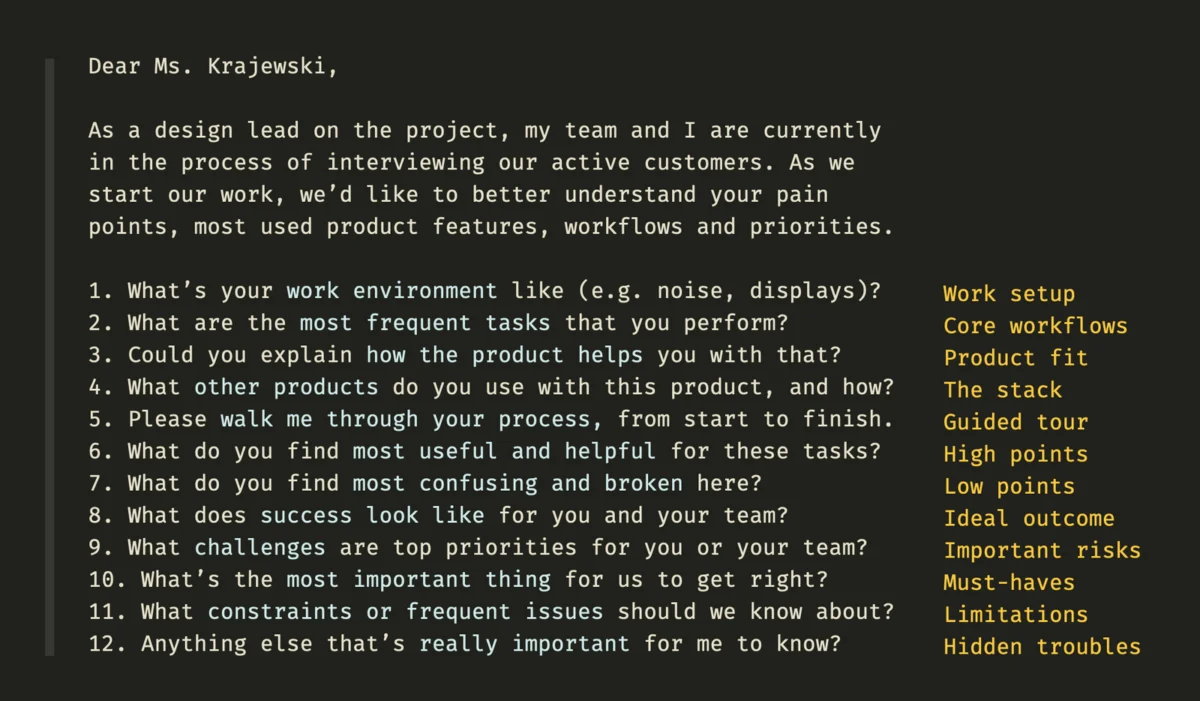
Designers must begin by asking critical questions of the current stakeholders: What are the core features that must remain? Which workflows are utilized daily versus those that are obsolete? Mapping these dependencies is essential because legacy systems often feed data into external dashboards, third-party agencies, and integrated partner services that the design team may not even be aware of.
Task analysis becomes the primary tool in this phase. By observing heavy users—those who have developed "muscle memory" workarounds for the system’s flaws—designers can identify the "pain points" that offer the highest return on investment if fixed. This collaborative approach helps build trust with users who may be skeptical of changes to a system they have relied upon for years.

The Five Core Migration Strategies
Once the discovery phase is complete, organizations must choose a migration strategy that balances UX goals with technical feasibility. There is no one-size-fits-all solution, but the following five approaches are the industry standard:
- Rehosting (Lift and Shift): Moving the legacy system to a modern infrastructure (such as the cloud) without changing its code or UI. This offers minimal UX improvement but can improve system speed and reliability.
- Refactoring: Optimizing the existing code without changing the external behavior. This allows for incremental UI updates and the removal of technical debt that slows down the user experience.
- Replatforming: Making minor changes to the code to take advantage of new platform features. This often involves updating the "wrapper" of the application to make it look more modern while keeping the core logic intact.
- Rearchitecting: Shifting to a new application architecture while altering the code to exploit new capabilities. This is where significant UX gains are usually made, as it allows for the redesign of complex user flows.
- Rebuilding: Discarding the old code and starting from scratch. While this offers the most UX freedom, it carries the highest risk of losing essential business logic and functionality.
Managing Stakeholder Expectations and Reactions
The human element is perhaps the most complex variable in legacy UX projects. Because these systems are at the core of the business, any proposed change is met with a mixture of skepticism, fear, and high expectations.

Internal stakeholders often present conflicting priorities. Executives may focus on the ROI of the migration and the speed of delivery, while IT departments may be concerned with security and system stability. Meanwhile, the end-users—often corporate employees—may resist change because they have mastered the idiosyncrasies of the old system. To mitigate this, design leads must involve these parties throughout the process.
Reporting progress repeatedly and running pilot projects are essential tactics for building confidence. By demonstrating small, successful improvements in a controlled environment, design teams can prove that the modernization effort will not disrupt the business. Inverted feedback loops, where users are invited to test early prototypes and provide "rigorous" criticism, ensure that the new system matches the customized functionality of the old one.

Analysis of Implications: The ROI of Legacy UX
The implications of successful legacy UX improvement extend far beyond a cleaner interface. For the enterprise, the primary benefit is operational efficiency. When employees spend less time fighting a "broken" system, productivity increases. Furthermore, reducing the "cognitive load" on workers leads to fewer data entry errors and higher employee retention rates; workers in the modern era are increasingly frustrated by tools that do not meet the usability standards of the consumer software they use in their personal lives.
From a technical perspective, tackling legacy UX allows for the gradual dismantling of "Frankenstein" architectures. By standardizing design patterns and documentation, the organization reduces its future UX debt, making it easier to integrate emerging technologies like artificial intelligence and automated data processing.

Ultimately, the goal of improving legacy systems is to transform a "black box" into a transparent, scalable asset. While the process is slow and requires significant preparation, the impact is profound. Organizations that successfully navigate these transitions are often rewarded with a more resilient infrastructure and a workforce that is better equipped to handle the demands of a digital-first economy.
Conclusion
Modernizing the user experience of a legacy system is one of the most challenging tasks a design team can undertake. It requires a deep respect for the existing system’s history and a cautious, data-driven approach to change. By focusing on workflow mapping, stakeholder collaboration, and incremental migration strategies, designers can drive significant impact without jeopardizing the stability of the organization. As Vitaly Friedman and other industry leaders emphasize in frameworks like "Measuring UX Impact," the success of these projects is measured not just in aesthetics, but in the long-term health and efficiency of the business. Those who master the art of the legacy upgrade will find their work remembered and respected for years to reflect the foundational role these systems play in the global economy.

