
The global technology landscape is currently witnessing a fundamental shift in how artificial intelligence is delivered to the end-user, moving away from standalone platforms toward a philosophy of "Quiet AI" and seamless integration. As the initial excitement surrounding generative AI transitions into a phase of practical implementation, industry experts and user experience (UX) designers are identifying a critical friction point: the proliferation of too many independent tools. Rather than seeking additional applications to manage, modern users are demanding that AI capabilities be embedded directly into their existing workflows, aligning with established mental models and reducing the cognitive load associated with context switching.
The Problem of Tool Proliferation and Context Switching
In the wake of the 2022 generative AI boom, the market was flooded with "AI-first" products—applications designed with artificial intelligence as the primary interface. However, recent productivity data suggests that the "app for everything" model has reached a point of diminishing returns. According to research from the Harvard Business Review, the average enterprise employee switches between different applications and windows nearly 1,200 times a day. This "toggle tax" accounts for approximately four hours a week, or five weeks a year, of lost productivity.
The emergence of AI-first tools has, in many cases, exacerbated this issue. When a user must leave their primary work environment—such as a spreadsheet, a document editor, or a file management system—to interact with a separate AI chatbot or terminal command, the resulting disruption to their "flow state" often outweighs the time saved by the AI’s output. Consequently, the industry is seeing a pivot toward integrations that address problems characterized by high severity, high frequency, and high levels of frustration without requiring the user to navigate away from their current task.
The Rise of Quiet AI and Contextual Assistance
The concept of "Quiet AI" represents a departure from the intrusive, attention-seeking nature of early chatbots. Unlike "AI-first" products that demand the user learn new workflows, Quiet AI operates in the background, assisting with repetitive and frustrating tasks autonomously or through subtle prompts. This approach respects the years of design decisions and user habits that have shaped modern software expectations.
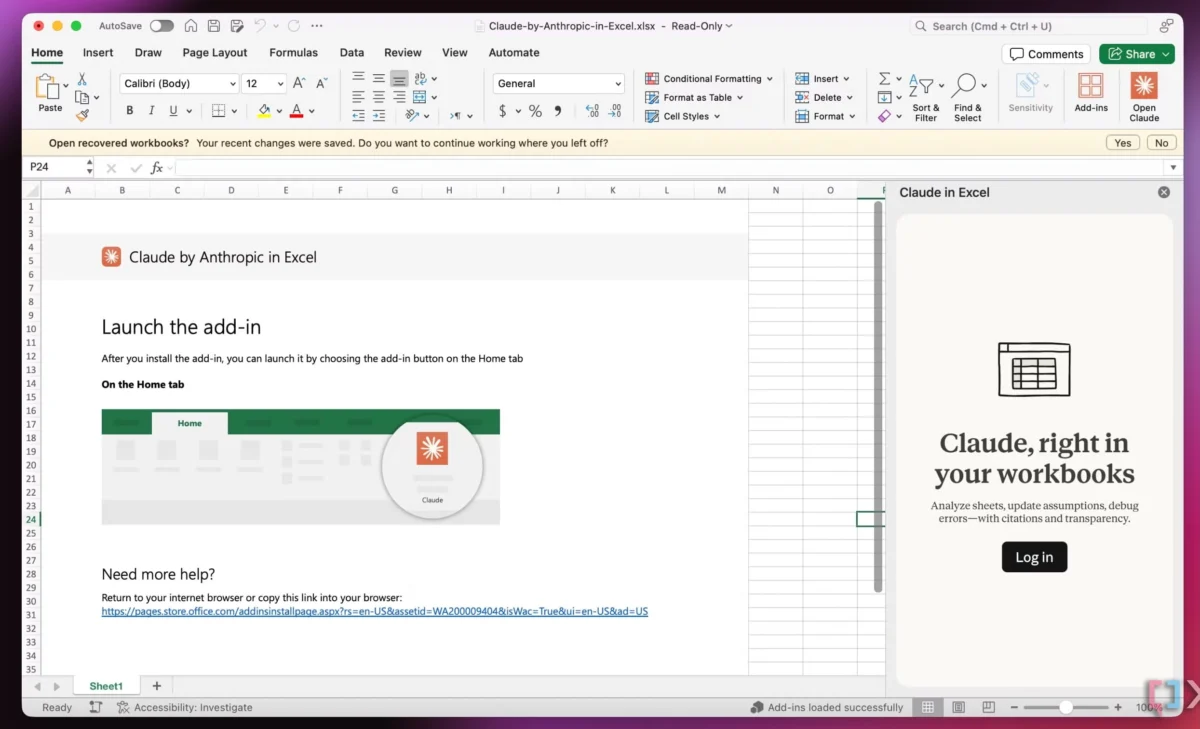
A primary example of this trend is the integration of Anthropic’s Claude into the Microsoft 365 suite, including Excel, PowerPoint, and Word. Rather than functioning as a separate entity, the AI exists within the context of the user’s data. In Excel, for instance, the AI can analyze specific rows or columns directly within the spreadsheet interface. This allows users to perform complex data synthesis and cleaning without the need to export data or jump between tools. This level of integration ensures that the AI serves the workflow, rather than the workflow serving the AI.

System-Level Innovation: The Case for Folder Instructions
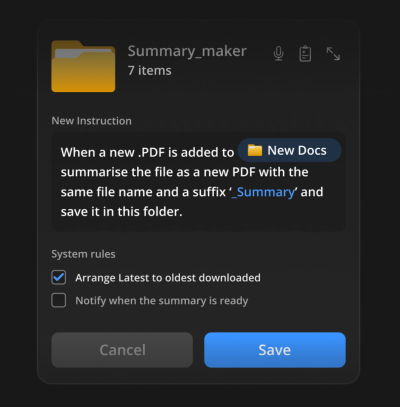
One of the most significant conceptual leaps in seamless integration is the move toward system-level AI, specifically through the implementation of "folder instructions." Proposed by design innovators such as Karthikeya GS, this concept suggests that the operating system’s file management structure can be imbued with AI capabilities.
Folder instructions allow users to define the intent and behavior of a specific directory on their machine. Instead of manually organizing files or running external scripts, the user sets a "rule" for the folder. For example, a folder labeled "Passport Application" could be programmed with instructions to automatically identify missing documents, summarize the requirements from PDF guides, and alert the user when the application package is complete.
This method provides several distinct advantages:

- Locally Scoped Permissions: The AI’s access is restricted to the specific folder, addressing significant privacy and security concerns associated with cloud-based AI tools.
- Automation at the Source: Tasks such as PDF summarization, image resizing, or file renaming occur where the work actually happens—the file system—rather than in a third-party browser tab.
- Mental Model Alignment: Users have understood the concept of "folders" for decades. Adding "instructions" to a folder builds upon an existing mental model rather than forcing the adoption of a new one.
A Chronology of AI Interface Evolution
The trajectory of AI user interfaces over the past two years illustrates a rapid maturation of the technology:
- Phase 1: The Chatbot Era (Late 2022 – Early 2023): Following the release of ChatGPT, the dominant interface was the conversational thread. Users were required to learn "prompt engineering" and move data back and forth between apps.
- Phase 2: The Wrapper Explosion (Mid-2023): Thousands of startups launched "AI wrappers," which were essentially thin skins over existing Large Language Models (LLMs) designed for niche tasks. This led to the "tool fatigue" currently felt by many users.
- Phase 3: The Sidebar and Copilot Era (Late 2023 – Early 2024): Major platforms began integrating AI sidebars (e.g., Microsoft Copilot, Adobe Firefly). While more integrated than chatbots, these still often felt like "add-ons" rather than core features.
- Phase 4: The Integration and Agentic Era (Mid-2024 – Present): The focus has shifted toward "Quiet AI" and system-level agents. The goal is to make the AI invisible, focusing on output and automation within the user’s primary interface.
Supporting Data and Market Sentiment
Market analysis reflects a growing skepticism toward standalone AI tools that do not offer deep integration. A 2024 survey of Chief Information Officers (CIOs) conducted by Gartner found that "ease of integration with existing tech stacks" was the number one priority for AI procurement, outranking even "model accuracy." Furthermore, user retention rates for standalone AI apps have historically been lower than for integrated features within established platforms like Slack, Notion, or GitHub.
The psychological impact of seamless integration is also measurable. Studies in human-computer interaction (HCI) indicate that when a tool aligns with a user’s existing mental model, the "learning curve" is replaced by "intuitive discovery." This leads to higher adoption rates and lower rates of user error. In contrast, "AI-first" workflows that require users to master terminal commands or complex multi-step chat interactions often see high initial trial rates but low long-term stickiness.

Official Responses and Industry Standards
In response to these shifts, design leaders are calling for new standards in AI UX. Vitaly Friedman, a prominent figure in the web design community and founder of Smashing Magazine, has emphasized the need for "Design Patterns for AI Interfaces." These patterns are intended to move the industry away from experimental UI and toward a standardized set of guidelines that prioritize user intent and minimize disruption.
The focus of these new design patterns includes:
- Context-Aware Triggers: AI assistance that appears only when the system detects a high-friction task.
- Scoped Transparency: Clearly showing the user what the AI is doing within a specific context (like a folder or a document) without overwhelming them with technical logs.
- Frictionless Handoffs: Ensuring that when an AI completes a task, the output is immediately actionable within the current application.
Broader Implications for the Future of Work
The shift toward seamless integration suggests that the future of software may not be defined by who has the most powerful model, but by who has the most intuitive integration. For software developers, this means the "API-first" approach is more important than ever, as tools must be able to "talk" to one another to provide a unified user experience.
For the end-user, the "Quiet AI" movement promises a return to productivity. By automating the "drudge work"—the repetitive, high-frequency tasks that cause frustration—integrated AI allows humans to focus on higher-order creative and analytical work. The value of technology is increasingly being measured not by how much time a user spends in an app, but by how much time the app saves the user outside of it.
As system-level AI and folder instructions become more prevalent, the boundary between the operating system and the application will continue to blur. This evolution suggests a future where the computer is no longer just a digital filing cabinet or a typewriter, but an active collaborator that understands the context of the user’s goals and manages the mechanical details of the digital environment autonomously. The ultimate goal of this transition is clear: to reduce the burden of technology so that the user can focus on the work that matters.

