
The rapid proliferation of artificial intelligence has ushered in an era of unprecedented software development, yet a growing body of evidence suggests that the "app for everything" model is reaching a point of diminishing returns. Industry experts and user experience (UX) researchers are increasingly observing that the modern digital worker is not seeking more standalone tools to manage; rather, they are demanding the seamless integration of intelligent capabilities into the software environments they already inhabit. This shift from "AI-first" products to "Quiet AI" represents a fundamental change in how technology is designed, prioritizing established mental models over the novelty of standalone smart workflows.
The Problem of Tool Sprawl and Context Switching
As the technology sector pivoted toward generative AI in late 2022, the market was flooded with specialized applications designed to summarize text, generate images, or automate coding. While these tools offered significant power, they introduced a secondary problem known as "tool sprawl." According to data from a 2022 Harvard Business Review study, the average employee toggles between different apps and websites nearly 1,200 times a day. This constant context switching creates a "toggle tax," which researchers estimate can cost up to 40% of a worker’s productive time.
The friction inherent in navigating terminal commands, managing endless back-and-forth chat interactions, and jumping between disparate platforms has led to a state of user fatigue. UX designers, including Vitaly Friedman, creator of "Design Patterns For AI Interfaces," argue that the most successful implementations of AI are those that address problems characterized by high severity, high frequency, and high levels of frustration without requiring the user to leave their current workspace.
The Evolution of the AI Integration Timeline
The trajectory of AI implementation has moved through several distinct phases over the last decade, leading to the current emphasis on integrated functionality:
- The Analytical Era (2010–2020): AI primarily operated in the background of consumer apps, powering recommendation engines (Netflix, Amazon) and spam filters without direct user interaction.
- The Standalone Chatbot Surge (2022–2023): The release of ChatGPT and Claude sparked a rush to create destination sites where users had to copy and paste data from their work documents into a separate browser tab to receive assistance.
- The AI-First Experimentation (2023–Early 2024): Startups attempted to build entirely new operating systems or hardware devices (such as the AI Pin or Rabbit R1) centered solely around AI, often ignoring decades of established UI conventions.
- The Integration Pivot (Mid-2024–Present): A realization that users prefer "Quiet AI"—features that sit within existing tools like Microsoft Excel, Word, or system-level file managers—has led to a resurgence in plugin-based and embedded AI architecture.
AI-First vs. Quiet AI: A Strategic Analysis
The concept of "AI-first" design often assumes that the technology should be the centerpiece of the user experience. However, critics argue this approach frequently ignores the "mental models"—the internal maps of how things work—that users have developed over years of using traditional software. A spreadsheet user expects rows and columns; a writer expects a blank page and a cursor. Forcing these users into a chat-based interface to perform traditional tasks often results in lower efficiency.

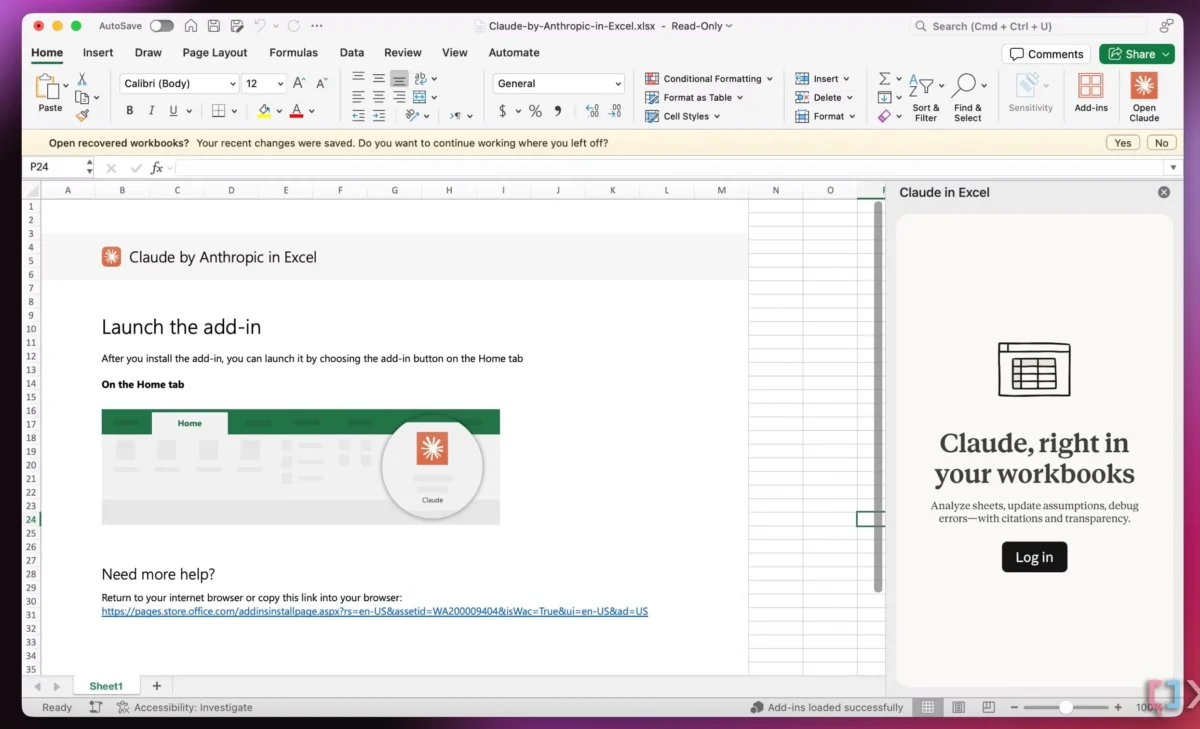
In contrast, "Quiet AI" refers to intelligent features that remain invisible until needed. These tools assist in repetitive or frustrating tasks—such as data cleaning in Excel or formatting in PowerPoint—without screaming for attention. The recent integration of Anthropic’s Claude into the Microsoft 365 suite serves as a primary example. By allowing users to analyze specific rows or columns directly within a spreadsheet, the integration respects the user’s workflow while providing the "smart" capabilities of a Large Language Model (LLM).
System-Level Innovation: The Case for Folder Instructions
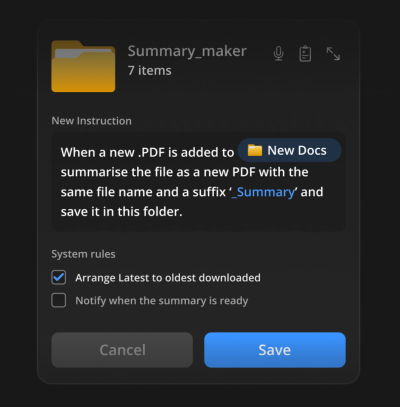
One of the most significant recent developments in integrated UX is the concept of "Folder Instructions" for system-level AI. Proposed by designer Karthikeya GS, this approach leverages the most fundamental metaphor in computing: the file folder. Instead of using a separate AI file manager, users can define specific "intents" for a folder.
For example, a folder labeled "Passport Application" could be given instructions to automatically verify if uploaded documents meet size requirements, summarize the status of the application, and flag missing items. Similarly, a folder for "Research PDFs" could be programmed to automatically generate one-page summaries of any document dropped into it.

This model offers several advantages over standalone AI tools:
- Locally Scoped Permissions: Actions are confined to a specific directory, enhancing data privacy and security.
- Zero Learning Curve: The user interacts with the system using a method they have understood since the 1980s—moving files into folders.
- Automation at the Source: The work happens exactly where the data lives, eliminating the need to upload files to a third-party web interface.
Supporting Data on User Preferences
Market research indicates a clear preference for embedded utility over novelty. In a recent survey of enterprise software users, 68% of respondents stated they would prefer AI features to be added to their existing tools rather than having to learn a new AI-specific platform. Furthermore, data from productivity software telemetry suggests that features with "low discoverability but high contextual relevance" (features that appear only when a user performs a specific action) have a 30% higher retention rate than "AI sidebars" that are permanently visible.
The financial implications are also notable. For SaaS providers, integrating AI into existing tiers or as a "pro" add-on has proven more effective at reducing churn than launching standalone AI products. Users view integrated AI as a value-add to their existing subscriptions, whereas standalone tools are often the first to be cut during budget reviews.

Professional Reactions and Industry Impact
The design community has reacted with cautious optimism toward this shift. Vitaly Friedman, a leading voice in the UX space, emphasizes that the value of AI does not emerge from users juggling multiple applications. "User value comes from reducing frustrations, slowdowns, and mistakes," Friedman notes in his latest design guidelines. He argues that "seamless integration" is an underused but incredibly impactful way to deliver value without the "burden of installing and learning yet another tool."
From a development perspective, this trend is driving a surge in API (Application Programming Interface) utilization. Companies like OpenAI, Anthropic, and Google are focusing heavily on making their models "embeddable," recognizing that their future growth lies in being the "engine" inside other products rather than just being the "destination" for end-users.
Broader Implications for the Future of Work
The transition toward integrated AI suggests a future where the "operating system" becomes more proactive. If AI can understand the intent of a folder or the context of a spreadsheet cell, the role of the user shifts from "operator" to "editor." This has profound implications for workforce training; the skill of the future may not be "how to use an AI tool," but rather "how to structure workflows so that AI can assist effectively."
Moreover, the "Quiet AI" movement addresses the growing concern regarding "digital clutter." By reducing the number of icons on a taskbar and the number of accounts a user must maintain, integrated AI promotes a more focused and less stressful digital environment.
Conclusion: The Path Toward Seamlessness
The tech industry’s fascination with "shiny new tools" is beginning to give way to a more mature understanding of user needs. The most impactful AI implementations of the coming years will likely be those that users barely notice as "AI." They will simply be better folders, smarter spreadsheets, and more intuitive word processors.
As demonstrated by the emerging design patterns for AI interfaces, the goal is to bridge the gap between human intent and machine execution. By aligning AI capabilities with established mental models—like the folder or the document—developers can reduce the "toggle tax," minimize cognitive load, and finally deliver on the promise of increased productivity that the AI revolution has long touted. The focus is no longer on what the AI can do in isolation, but on how seamlessly it can disappear into the fabric of our daily digital lives.

