
The rapid proliferation of Large Language Models (LLMs) since late 2022 has ushered in a transformative era for digital interaction, yet it has simultaneously narrowed the design perspective of the technology industry. As organizations rush to integrate generative artificial intelligence into their workflows, a phenomenon known as "conversational tunnel vision" has emerged. This trend defaults nearly every AI capability into a chat-based interface, a decision driven more by the nature of the data used to train LLMs than by the actual needs of the end-user. While dialogue-based interfaces are effective for exploratory queries, industry experts argue that great user experience (UX) requires matching the modality of interaction—seeing, hearing, touching, or speaking—to a user’s specific context, intent, and cognitive load.
The Evolution of Interaction: From CLI to NLI
To understand the current reliance on chatbots, it is necessary to examine the chronology of Human-Computer Interaction (HCI). The industry has transitioned through three major eras: the Command Line Interface (CLI) of the 1970s and 80s, which required precise syntax; the Graphical User Interface (GUI) popularized in the 1990s, which utilized visual metaphors and spatial reasoning; and the current era of Natural Language Interfaces (NLI).
The surge in NLI adoption is unprecedented. According to data from Bloomberg Intelligence, the generative AI market is poised to grow to $1.3 trillion by 2032. However, the "last mile" of this growth depends on usability. The industry’s current fixation on the "chat bubble" as the universal home for AI ignores decades of UX research regarding cognitive ergonomics. When an interface forces a user to adapt to the machine’s preferred medium rather than the other way around, it creates a "psychological tax" that can impede productivity and safety.
The Dual Burden: Linguistic and Cognitive Barriers
The reliance on a text-heavy interface imposes two distinct challenges: a linguistic challenge for input and a cognitive challenge for output. In a traditional GUI, buttons and menus serve as "affordances"—visual cues that signal what is possible. A blank chat box, conversely, often leads to choice paralysis. Users are forced to engage in "prompt engineering," a creative and often exhausting act of translating a vague intent into a specific, syntactically correct command.
For instance, a data analyst seeking to filter a complex dataset can perform the task in milliseconds using a slider or a checkbox. In a chat interface, that same analyst must describe the logic in a complete sentence, increasing the time-to-task completion. Furthermore, the output of AI systems often defaults to "serial processing." Because text is a sequential medium, the human brain must process one word after another to extract meaning. This is fundamentally slower than "parallel processing," where a user can glance at a color-coded dashboard and immediately identify a trend or an outlier.
In high-stakes environments, such as medical diagnostics or financial trading, the time spent reading a narrative description of data rather than viewing a chart is not merely a convenience issue; it is a point of failure that increases the risk of error.
A Taxonomy of Input and Output Modalities
To move beyond the chatbot monoculture, product teams must adopt a broader taxonomy of modalities. Modality is defined as the specific sense a person uses to interact with a system. By diversifying the toolkit, designers can reduce the "adaptation load" on the user.
Input Modalities and Rationale
- Button/Tap: Ideal for binary actions. It eliminates recall overhead by utilizing recognition over memory.
- Voice: Critical for "hands-busy, eyes-busy" contexts, such as field maintenance or medical surgery.
- GUI (Filters, Sliders): Essential for setting complex parameters or spatial tasks where visual precision is required.
- Multi-modal (Image + Text): Reduces the "linguistic barrier" by allowing users to reference objects directly rather than describing them.
Output Modalities and Rationale
- Push Notifications: Best for ambient awareness and time-sensitive updates that require only a glance.
- Audio Summaries: Necessary when the user’s visual attention is directed elsewhere, ensuring safety and situational awareness.
- Visual Dashboards: The gold standard for high-density, comparative analysis, allowing for rapid trend detection.
- Interactive Canvases: Crucial for generative tasks where the user needs to manipulate the output directly rather than through text commands.
The Task Audit: A Framework for Strategic Selection
The transition from a default chatbot to a context-aware interface requires a rigorous Task Audit. This framework moves development teams away from assumptions and toward evidence-based design. A comprehensive audit focuses on four critical areas: Physical Constraints (the user’s environment), Social Constraints (privacy and noise), Cognitive Load (the mental effort required), and Fidelity Needs (the required precision of the output).
To gather this data, researchers utilize several established methodologies:

- Contextual Inquiry: Observing users in their natural workspace to identify "hidden work"—the small steps or workarounds that users often fail to mention in interviews.
- Focused Interviews: Surfacing the mental models and decision points that drive a workflow, particularly the "verification anxiety" associated with high-stakes tasks.
- Collaborative Workshops: Bringing together engineers, product managers, and end-users to map every step of a process and identify where the current modality fails.
By grounding design decisions in field evidence, organizations can avoid the "creative act" barrier of prompting and the "interpretive work" burden of reading long-form AI responses.
Case Study: Adaptive Modality in High-Voltage Environments
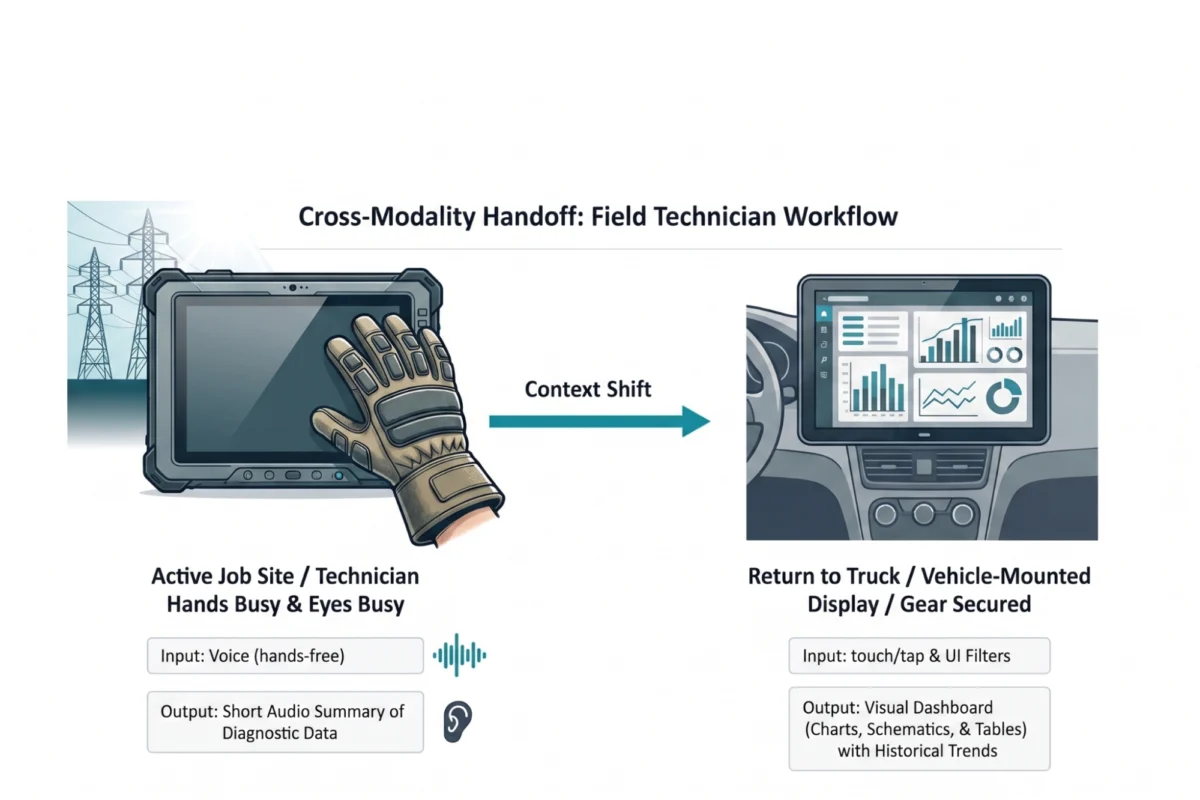
The practical application of these principles is most visible in the utility sector. Field technicians servicing high-voltage electrical grids operate in some of the most demanding physical environments imaginable. Traditionally, these workers were required to use ruggedized tablets to access manuals and log data.
A Task Audit conducted for a national utility provider revealed three major points of failure. First, technicians wear thick, protective gloves, making precise touchscreen interaction impossible. Second, direct sunlight creates severe screen glare, rendering text-heavy diagnostic reports unreadable. Third, the "eyes-busy" nature of working with live wires makes looking down at a screen a significant safety hazard.
The resolution was a multi-modal handoff system. While on the job site, technicians use voice input to query the AI and receive short audio summaries of diagnostic data. This allows them to maintain focus on the equipment. Once the technician returns to their vehicle, the system automatically hands off the workflow to a large, high-resolution dashboard mounted in the truck. This transition from "ambient audio" to "dense visual" reduced diagnostic time by 20% and significantly increased safety compliance.
Broader Impact and Industry Implications
The shift toward multimodal AI interfaces has profound implications for accessibility and global productivity. For users with visual or motor impairments, the move away from text-only interfaces is not a luxury but a necessity. By providing multiple pathways to information—such as screen-reader-optimized audio or gesture-based controls—companies can ensure that AI capabilities are truly inclusive.

Furthermore, as AI becomes more integrated into "edge" devices—wearables, automotive systems, and industrial sensors—the need for "glanceable" and "ambient" interfaces will only grow. The goal is the creation of "Ambient Intelligence," where the system anticipates the user’s needs and provides information in the most efficient modality for that specific moment.
Conclusion and Implementation Strategy
The future of AI interface design is not a single chat window, but a diverse ecosystem of visual, vocal, and haptic interactions. To remain competitive, product teams must resist the path of least resistance. While building a chatbot is fast and familiar, building an interface that feels like a natural extension of the user’s workflow is what drives long-term adoption.
For organizations looking to implement these changes, a "lightweight" Task Audit is the recommended starting point. By spending even a few hours observing the actual environment where a task is performed, designers can identify the physical and cognitive barriers that a text box cannot solve.
Modality Task Audit Field Template
To assist teams in this transition, the following audit checklist is utilized by leading UX researchers:
Part 1: Environmental Assessment

- Are the user’s hands occupied (e.g., carrying tools, wearing gloves)?
- Is the user’s visual focus required elsewhere for safety (e.g., driving, operating machinery)?
- Is the environment loud (limiting voice input) or public (limiting voice output)?
Part 2: Cognitive Load Evaluation
- Does the task require high precision (GUI needed) or is it exploratory (Chat viable)?
- Is the "Verification Anxiety" high? (If so, provide clear, visual confirmation of actions).
- What is the "Reading Density"? (Can this paragraph be a single status icon?)
Part 3: Journey Mapping
- How does the user’s context change throughout the day?
- Where are the "handoff" points between mobile, desktop, and ambient interactions?
By aligning interaction modalities with the physical and social realities of the user, the industry can finally move past "conversational tunnel vision" and deliver AI tools that are as intuitive as they are powerful. The right modality respects the user’s state at the moment of interaction, ensuring that technology serves the human, rather than the human serving the machine.

